Justin A. Parr - Technologist

Technology, Strategy, Insights, and Tech Support

  • HOME
  • Quick Facts
  • CygUlarn Win32
  • About Me

Proxy vs Firewall

Posted by Justin A. Parr on September 23, 2016
Posted in: Tech Support. Leave a Comment

Proxy vs Firewall

I got asked the question recently, “What is the difference between a proxy and a firewall?”

I’ll paraphrase my simple analogy in response:

If you think of a firewall as a telephone, you can think of a proxy as a telephone operator.

As analogous to a firewall, you can think of calling the server via telephone, and then speaking directly to the server in order to make a request, and the server responds to you directly.  The telephone might have some rules built in to it, about who you are allowed to call, and when (these are the firewall rules).

Extending this analogy, a proxy is like a telephone operator.  Rather than make a request to the server directly, you are only allowed to call the operator.  The operator receives your entire request, and then makes a separate call to the server.  After passing the request to the server, the operator then receives the entire response from the server, and passes the response to you.

Now, imagine that the operator must consult a long list of rules to see if your request is valid before passing it to the server, and also must compare the server response to another long list of rules to ensure that it’s valid before passing the response back to you.  This is known as filtering.


Give the User Base What They Want

Posted by Justin A. Parr on September 19, 2016
Posted in: Analyses and Responses. 1 comment

Or,

How to Not Screw Up Your Product

From time to time, manufacturers and developers make unilateral design decisions that affect the way a product functions.

This isn’t always a good thing.

Here are some examples of why major product design changes should always include feedback from the user community.

Continue Reading

Electric Cars are NOT Environmentally-Friendly

Posted by Justin A. Parr on September 10, 2016
Posted in: Analyses and Responses. Leave a Comment

So, you’ve been thinking about “going green” by purchasing and driving an electric car — you think you’ll be helping to save the environment.  I have news for you – you’ll still produce carbon emissions and other waste, and you’ll tax the already-overburdened power grid.

We’ll compare electric to conventional gas and diesel engines, and examine some truly environmentally-friendly alternatives.

Continue Reading

Shortcut: Pinch to Zoom in Android Emulator

Posted by Justin A. Parr on August 27, 2016
Posted in: Tech Support. Leave a Comment

Shortcut:  Pinch to Zoom in Android Emulator

Also, pinch to zoom with one finger in Android

This is known to work with Android Marshmallow.  I have not tried this with other versions, but I have tried it on Bluestacks emulator as well as physical devices.


Problem:  Can’t Pinch to Zoom in Android Emulator

When you do Android development, running an emulator is a necessity.  In the emulator, the mouse simulates a touch event.  Unfortunately, using only a mouse, you can’t “pinch to zoom” in or out.  Although some laptop panels and computer monitors support touch input, this is expensive, and not a guaranteed solution.


Solution: Tap then Drag

Remember that the left mouse button simulates a virtual finger touching the display…

  • Tap:  Click the mouse button (quickly press, then release the left mouse button)
  • Drag:  Press the left mouse button and hold it down.  Move the mouse to a desired location, then release the left mouse button.

In quick succession, Tap, then Drag


Zoom Out

Starting at the bottom-middle of the display, tap, then drag up to the upper-right.
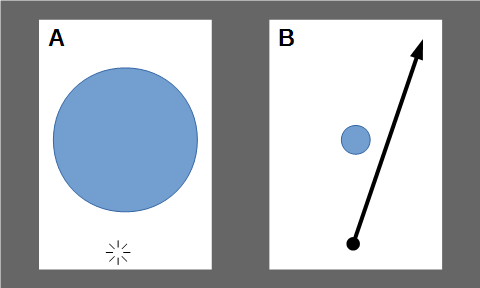
Zoom Out: Click (A) then quickly touch and drag (B) from the bottom-middle to the upper-right.

Zoom Out: Tap on the bottom-middle (A) then quickly touch and drag (B) from the bottom-middle to the upper-right.


Zoom In

Starting at the upper-right of the display, tap, then drag down to the bottom-middle.
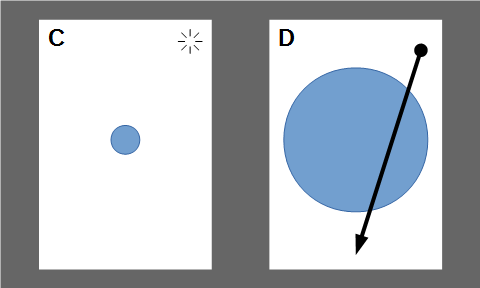
Zoom In: Tap on the upper-left (C) then quickly touch and drag (D) from the upper-left to the bottom-middle

Zoom In: Tap on the upper-left (C) then quickly touch and drag (D) from the upper-left to the bottom-middle


Caveats

  • This is known to work with applications that let you pan in both directions, such as Google Maps
  • Although this effect seems to be built in to the OS, it might be difficult to trigger this effect in applications that explicitly scroll in one direction (such as vertical only).
  • This approach might not work with applications that implement their own custom multi-touch logic.

 

The Modern MacGyver

Posted by Justin A. Parr on August 17, 2016
Posted in: The Light Side. 1 comment

MacGyver was a 1980’s TV action hero, known for being able to quickly apply his extensive math / science / engineering skills in order to save the day.


MacGyver always carried standard gear on his person that included his iconic Swiss Army knife, duct tape, paper clips, and chewing gum.  In every episode, he employed creativity, his gear, and science to re-purpose common items in order to build a machine or otherwise develop a solution for some major problem.

Fast forward to fall 2016 –  CBS is about to release a modern reboot.

What skills and technology would a “modern” MacGyver employ?

(Note – this is being written without any advanced knowledge of the reboot, except, having seen the trailer)

Read on, to find out.

Continue Reading

STOP WINDOWS 10 UPGRADE AND GWX

Posted by Justin A. Parr on April 29, 2016
Posted in: Tech Support. Leave a Comment

STOP WINDOWS 10 UPGRADE AND GWX

FINALLY…

You can add these two registry settings to your Windows 7/8 machines, to STOP the “Get Windows 10” (GWX) upgrade prompts.

  1. Create an empty text file on your desktop, called “DisableWindowsUpgrade”
  2. Open the empty file
  3. Copy the text in the box below, to the empty file, and save it
    Windows Registry Editor Version 5.00
    
    [HKEY_LOCAL_MACHINE\SOFTWARE\Policies\Microsoft\Windows\WindowsUpdate]
    "DisableOSUpgrade"=dword:00000001
    
    [HKEY_LOCAL_MACHINE\SOFTWARE\Policies\Microsoft\Windows\Gwx]
    "DisableGwx"=dword:00000001
  4. Rename the file extension from “.txt” to “.reg”.  Usually, you can do this in file properties.
  5. Double-click the file, and click “YES” when prompted to make changes.
  6. Reboot.
  7. Enjoy your Upgrade-Free existence!


I created a batch file that creates the reg file, then runs regedit, to import these keys in to the registry.

You can download it here.  Right-click the following link, and select “Save As”:  DisableWindowsUpgrade.cmd

  1. Once you save the file, double-click to run it.
  2. Click “Yes” when prompted to make changes
  3. Reboot
  4. Enjoy your Upgrade-Free existence!

Tech Tip – Use USB Mouse and On-Screen Keyboard

Posted by Justin A. Parr on March 19, 2016
Posted in: Tech Tip. Leave a Comment

I had a unique situation occur while troubleshooting an XP machine – I had physical access to the machine, but not the keyboard and mouse.

I was able to use a USB mouse and On-Screen Keyboard (OSK) to navigate the user interface.

Here is how it works:

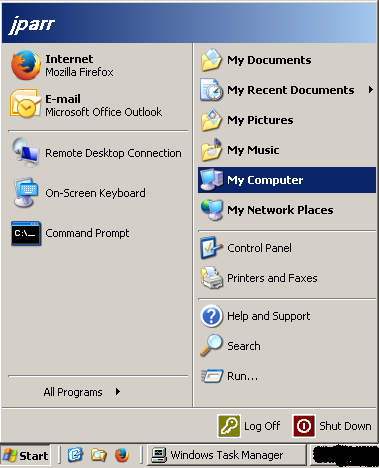
  1. Plug in the USB mouse.  After a couple of seconds, you should be able to move the mouse cursor.
  2. Click on “Start” (or whatever passes for Start, for your version of Windows)
    osk1
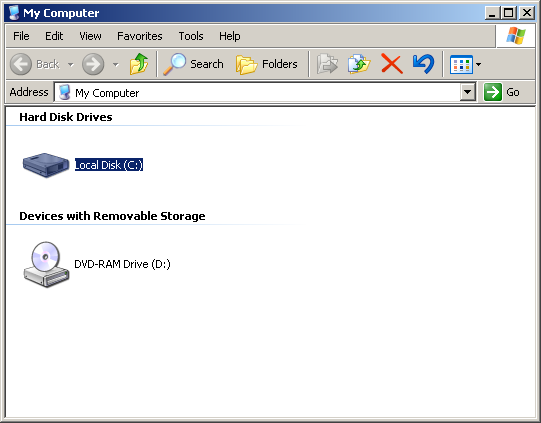
  3. Click on the computer name, to open an explorer window
    osk2
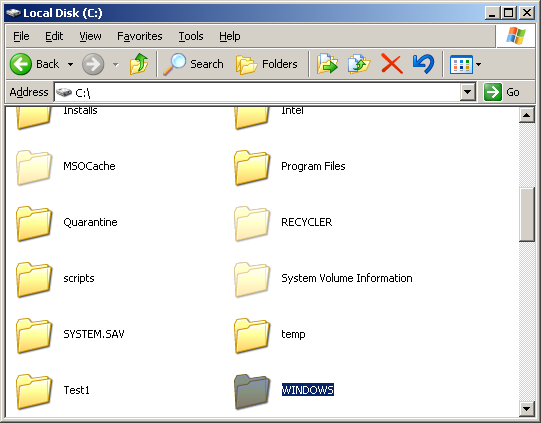
  4. Navigate to c:\windows
    osk3
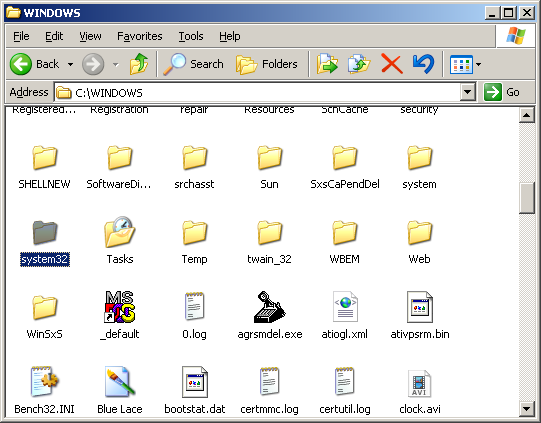
  5. In the “windows” folder, navigate to “system32”
    osk4
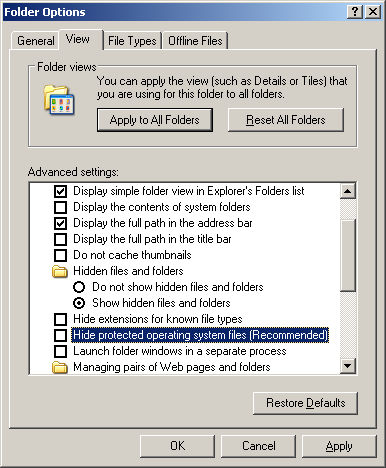
  6. If you can’t find it, go to folder options, select “Show hidden files and folders” and make sure “hide protected system files” is NOT checked.
    osk5
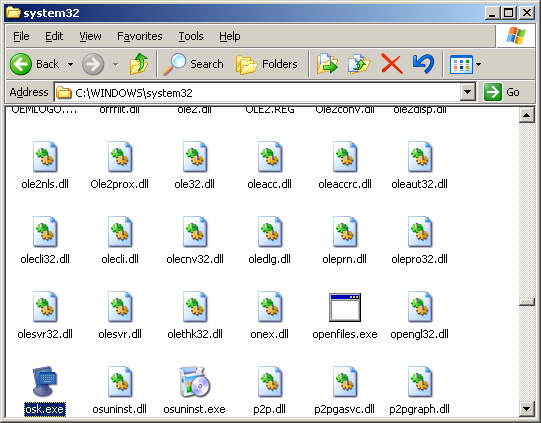
  7. In “system32”, find a file called “osk” or “osk.exe”, and double-click to open it.
    osk6
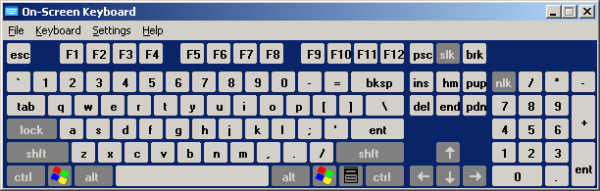
  8. The OSK will be displayed:
    osk7

The OSK will remain in the foreground, and allows you to “type” using the mouse.

For example, click the Firefox Address bar, then click-type:

g – o – o – g – l – e – . – c – o – m – ent (enter)

You can manipulate most OS and application functions quickly and easily, even if the system’s keyboard and mouse are locked out for some reason.


FIXED: Why the Android Permissions Framework Makes Android Unsafe, And How It Can Be Easily Fixed

Posted by Justin A. Parr on March 3, 2016
Posted in: Analyses and Responses, Good Design - Bad Design. Leave a Comment

Note:  This post was written PRIOR to Android 6.0 “Marshmallow” – please see the updates below for more details.  “Marshmallow”, by and large CORRECTLY handles app permissions.

When you download an Android app, you are presented with a list of permissions that the application requires in order to run.

You can either accept all of the permissions as stated, or cancel the installation – there is no middle ground.

This approach makes Android generally untrustworthy, but there is a simple way to fix it.

Continue Reading

Essential Computer Skills for All Office Workers

Posted by Justin A. Parr on March 3, 2016
Posted in: Analyses and Responses. 1 comment

Regardless of your job, if you work in an office, you should have these basic computer skills.

Continue Reading

MazeBot – Solving Mazes using Cellular Automata and State Machine Logic

Posted by Justin A. Parr on February 19, 2016
Posted in: Math and Science. 1 comment

Here is the YouTube video:


Here is a link to the PDF explaining the details of MazeBot:
Solving Irregularly-Shaped Mazes Using Cellular Automata and State Machine Logic


Here is a link to the Google Play Store, where you can download MazeBot to your Android Phone:
MazeBot on Google Play

Posts navigation

← Older Entries
Newer Entries →
  • Search!

  • Temperature at Casa de Parr

  • Recent Posts

    • Javascript Text-tris
    • R.I.P Charlie Kirk
    • Bad Design – Dell Latitude 7450 Laptop…Thing
    • Security Cameras – A Double-Edged Sword
    • Top Reasons Why Vegas Sucks Now (2024 Visit)
    • Excel – Number of Sundays – A better Answer
    • Cache Busting using Javascript
    • Javascript Calculator
    • Gatetrilogy Saga: The Front Gate Part III, The Final Gate Opener
    • The Dangers of Old Code – A Cautionary Tale
  • Topics

    • Analyses and Responses (27)
    • Good Design – Bad Design (35)
    • IT Management (1)
    • Justinisms (8)
    • Main Page (1)
    • Math and Science (31)
      • Computer Science (1)
    • Other Stuff (40)
    • Quick Facts (7)
    • Rants (18)
    • Tech Support (61)
      • Food and Cooking (10)
      • Tech Recommendations (12)
      • Tech Tip (7)
      • Wordpress Stuff (3)
      • Zen Cart Stuff (1)
    • The Light Side (37)
  • Links

    Log in or Register to post comments

    RSS Feed
    https://justinparrtech.com/JustinParr-Tech/feed

    View my LinkedIn Profile
    http://www.linkedin.com/in/justinparr

    About Me
    Justin A. Parr

    Who is Jill Parr
    Find out here.

  • Older Posts

    • September 2025 (2)
    • August 2025 (1)
    • July 2025 (1)
    • June 2025 (1)
    • February 2025 (1)
    • August 2024 (1)
    • May 2023 (1)
    • April 2023 (3)
    • January 2023 (1)
    • December 2022 (2)
    • November 2022 (2)
    • September 2022 (1)
    • August 2022 (3)
    • June 2022 (2)
    • March 2022 (1)
    • January 2022 (2)
    • December 2021 (1)
    • July 2021 (1)
    • May 2021 (1)
    • March 2021 (1)
    • February 2021 (2)
    • November 2020 (4)
    • October 2020 (1)
    • September 2020 (1)
    • August 2020 (1)
    • July 2020 (1)
    • June 2020 (1)
    • May 2020 (2)
    • April 2020 (1)
    • March 2020 (8)
    • February 2020 (2)
    • January 2020 (1)
    • November 2019 (2)
    • August 2019 (3)
    • July 2019 (1)
    • June 2019 (1)
    • April 2019 (1)
    • February 2019 (3)
    • January 2019 (1)
    • December 2018 (1)
    • November 2018 (1)
    • October 2018 (2)
    • September 2018 (1)
    • August 2018 (2)
    • July 2018 (1)
    • June 2018 (1)
    • April 2018 (1)
    • February 2018 (2)
    • January 2018 (2)
    • December 2017 (1)
    • November 2017 (2)
    • August 2017 (2)
    • July 2017 (1)
    • March 2017 (1)
    • February 2017 (2)
    • January 2017 (1)
    • December 2016 (5)
    • November 2016 (3)
    • September 2016 (5)
    • August 2016 (2)
    • April 2016 (1)
    • March 2016 (3)
    • February 2016 (2)
    • January 2016 (7)
    • December 2015 (3)
    • November 2015 (1)
    • October 2015 (3)
    • August 2015 (5)
    • July 2015 (3)
    • June 2015 (2)
    • May 2015 (4)
    • April 2015 (4)
    • March 2015 (3)
    • February 2015 (4)
    • January 2015 (8)
    • December 2014 (8)
    • September 2014 (1)
    • August 2014 (1)
    • July 2014 (2)
    • June 2014 (4)
    • May 2014 (1)
    • April 2014 (2)
    • March 2014 (3)
    • February 2014 (5)
    • January 2014 (1)
    • December 2013 (2)
    • October 2013 (2)
    • July 2013 (3)
    • April 2013 (1)
    • October 2010 (1)
    • August 2010 (1)
    • July 2009 (1)
    • April 2009 (1)
    • November 2008 (1)
    • October 2008 (1)
    • September 2008 (1)
    • May 2008 (1)
    • March 2008 (1)
    • January 2008 (1)
    • June 2005 (1)
    • May 2005 (4)
Proudly powered by WordPress Theme: Parament by Automattic.