Justin A. Parr - Technologist

Technology, Strategy, Insights, and Tech Support

  • HOME
  • Quick Facts
  • CygUlarn Win32
  • About Me

HOME

Posted by Justin A. Parr on April 28, 2013
Posted in: Main Page.

JPLogo

Hi!  Thanks for stopping by, and please feel free to look around.

Please register to leave comments – polite feedback is always appreciated.

Log In or Register to post a comment.

RSS Link:  https://justinparrtech.com/JustinParr-Tech/feed

MORE Updates on the Gate Controller

Some fun things to occupy your time:

  • Find the center of a circle
  • Make some quiche
  • Enumerate permutations of things
  • Have some laughs here, here, here, here, or here.

Conway’s “Game of Life” Implemented in Javascript

Posted by Justin A. Parr on June 1, 2026
Posted in: Other Stuff. Leave a Comment

Conway’s “Game of Life” Implemented in Javascript


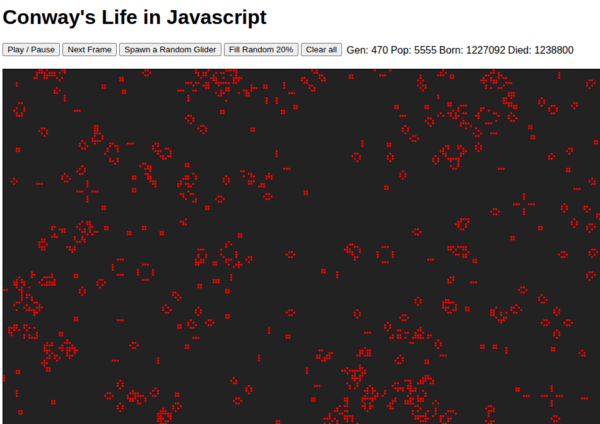
Click here to play:

Conway’s Life in Javascript

Instructions:

  1. Click the “Fill Random” button
  2. Click the “Play / Pause” button
  3. If things get boring, click “Spawn a Random Glider”


What is Game of Life?

Each cell has 8 neighbors.  Based on the number of neighbors:

  • If a cell has more than 3 neighbors, it dies of overcrowding
  • If a cell has fewer than 2 neighbors (1 or 0) it dies of loneliness
  • If a dead cell has exactly 3 neighbors, a new cell is born
  • If a cell has 2 or 3 neighbors, it continues to the next generation

Each “generation” results in these rules being applied to every cell on the game board, resulting in a new game board.  The new game board is then analyzed to produce the next generation, and so-forth.

The point of all of this, is that a few simple rules can create amazing complexity.

When mathematician John Conway came up with this in the 1970’s, it became extremely popular, despite having to be largely computed by hand on graph paper.  John Conway, who passed away in 2020 at age 82, is known for dozens of innovations in math, science, and computer science.


Tales from the Land of Javascript – Abuse of fillRect()

Posted by Justin A. Parr on June 1, 2026
Posted in: Other Stuff. Leave a Comment

I accidentally figured out how to make compute-expensive blobs in JavaScript using fillRect().  And….how to fix it.

Continue Reading

Convert WiFi RSSI to Signal Bars (Formula and Code Snippet)

Posted by Justin A. Parr on April 18, 2026
Posted in: Other Stuff. Leave a Comment

Convert WiFi RSSI to Signal Bars (Formula and Code Snippet)

I went way down the rabbit hole trying to convert RSSI (in dBm) to a useful signal strength meter, like you’d see on your cell phone.

I read many articles, but no one really had an algorithm.  So….here is an algorithm written in Javascript.


The Goods

//This assumes you have a way to obtain rssi... in my application,
//  this is the rssi for the web server's connection (IoT device).

function rssiToBars( rssi , maxbars ){
  var ret=rssi+80;        //Useful range is -80 (bad) to -30 (good).
                          //+50 converts this to a useful range of 0 (bad) to 50 (good)

  ret=(ret< 0)?0:rssi;   //Clamping
  ret=(ret>50)?50:rssi;

  ret=parseInt(ret*maxbars/50);    //taking a percent (rssi/50) of maxbars

  // If you are using a language with integer data types, make sure you multiply
  // first, then divide.

  return(ret);
}

function rssiMeter( bars , maxbars ){
  return("<PRE>[" + "#".reapeat(bars) + "-".repeat(maxbars-bars) + "]</PRE>");

  //This is a simple example, but you could stack a couple of small PNG or 
  //render a table where the cells are bars.
}

const maxbars=8
var rssi=-55;   //some magical way to get the rssi
var bars=rssiToBars(rssi,maxbars);
var meter=rssiMeter( bars , maxbars);

// rssi  == -55
// bars  ==  4
// meter ==  <PRE>[####---]</PRE>


How It Works

Received Signal Strength Indicator (RSSI) is the relative signal strength of a transmitter, from the receiver’s perspective.

RSSI is measured in dBm, or Decibel-milliWatts.  Basically, this is milliWatts as perceived by the receiver, but represented on a logarithmic scale.

Because power drops inversely with the square of the distance, a logarithmic scale more or less represents this as a linear scale, rather than exponential.

For example, if you have signal strength of -30 (very good) and you walk 50 feet away with no obstacles between you and the router, you might drop to -40 dBm.  If you walk another 50 feet, you would expect the signal to drop to -50 dBm.  This a super-simple example, and there are a lot of other factors involved, but you get the basic idea.

The algorithm works like this:

  1. Convert rssi to a useful scale.  We do this by adding 80.  If we start with a range of -30 (good) to -80 (bad) and add 30, we get 0 (good) to -50 (bad).  Further if we add 50, we get a positive integer that is now reversed:  -50+50==0 (bad) and 0+50==50 (good).
  2. Next, we clamp the values to prevent unexpected results, ensuring we now have an integer in the range of 0..50.
  3. Dividing this number by 50 yields a percentage (0..1)
  4. Multiplying the percentage by the max number of bars, gives you the number of bars.  For example, .5 * 8  (medium signal strength * 8 bars) == 4.
  5. If using a typed language such as c++, be sure to multiply first, THEN divide:  (rssi+50)*maxbars/50.  If not, the CPU will perform int math, and bars will be zero most of the time.

Rendering can be done however you want.  One slick trick is to use CSS and a small table, where each cell is a bar, and CSS dictates the cell color.  Your code sets the class of each cell to “bar” or “nobar”.

<STYLE>
.bar , .nobar {
  height: 10px;
  width: 10px;
  border: 1px solid gray;
  border-collapse:collaps;
  font-size: 1px; 
  /* Each cell has a non-breaking space in order to force it to render */
  /* Setting font-size to 1px ensures that the height of the cell will be honored */
}

.bar{
  background-color: #0000FF //Blue
}

.nobar{
  background-color: #000077 //Dark Blue
}
</STYLE>
<SCRIPT>
  function rssiMeter( bars , maxbars ){
    var meter="<TABLE STYLE='border-collapse:collapse;'><TR>";

    for(var i=0 ; i<maxbars ; i++){
      var class=(i<bars)?"bar":"nobar";
      meter+="<TD CLASS="+class+">&nbsp;";  
      //NO I DO NOT CLOSE MY TD TAGS.  SUE ME
    }

    meter+="</TR></TABLE>";

    return(meter);
  }

  // you can attach it to a DIV like this:
  const maxbars=8;        // define constants at the top of your script
  const divname="meter"; 

  function updateMeter( rssi ){
    var bars = rssiToBars(rssi , maxbars); //maxbars is a global const
    var meter= rssiMeter( bars , maxbars); 
    document.getElementById(divname).innerHTML=meter;   //divname is a global const
  }

  // be sure there is <DIV ID=meter>&nbsp;</DIV>
  // somewhere in your document

  //Now, whenever you want to update your meter:
  var rssi = somenumber;
  updateMeter( rssi );

</SCRIPT>

updateMeter(-55);

would produce:

Enjoy!

UPDATED: Arduino Web Server – Add favicon

Posted by Justin A. Parr on March 9, 2026
Posted in: Tech Support, Tech Tip. Tagged: Arduino, ESP32, favicon, favicon.ico, Webserver, WiFi Webserver. Leave a Comment

I went down a rabbit hole trying to add a “favicon” (Web page icon) to an ESP32 web server project.

No one seems to have a complete answer, so here you go!

UPDATE:  After I clicked “Publish” on the original version of this article, I started running in to all sorts of problems with my ESP32.

This sent me even deeper in to the rabbit hole, but I ultimately found a good solution.

Here is a step-by-step walk-through (UPDATED).


Continue Reading

ESP32 – Use built-in LED and BOOT Button

Posted by Justin A. Parr on March 4, 2026
Posted in: Other Stuff. Leave a Comment

ESP32 – Use built-in LED and BOOT Button

Did you know that the ESP32 has a built-in user LED and Utility Button?  No need to build a simple circuit to do testing.

Overview

The ESP32 is an amazing Arduino device that has lots of GPIO pins, plenty of CPU and memory capacity, as well as built-in WiFi and Bluetooth, and many other features.

  • The ESP32 has a built-in LED on pin 2, which you can use freely.
  • You can use the BOOT button on GPIO0 as a utility button.

Interface Description
■ Power LED Red when power is on
■ User LED Blue when activated by pulling GPIO2 HIGH.
■ EN Button “Enable”, normally HIGH.  Pushing the button pulls LOW, which reboots.
■ BOOT Button When used with “EN”, causes the device to boot in to programming mode.

Normally GPIO0 is HIGH (Normal boot mode).  Pushing the button pulls GPIO0 LOW (Enter programming / download mode).

However, after the device boots normally, the BOOT button can be used to send input to GPIO0.

Continue Reading

Javascript Text-tris

Posted by Justin A. Parr on September 11, 2025
Posted in: Computer Science, Math and Science. Leave a Comment

I’ve always wanted to write my own tetris clone.  I wrote one in javascript.  To give it a retro feel, I implemented the game using text graphics.

Continue Reading

R.I.P Charlie Kirk

Posted by Justin A. Parr on September 10, 2025
Posted in: Other Stuff. Leave a Comment

Some ass hat took it upon itself to kill another human being because it didn’t agree with Charlie Kirk’s opinion.

This is a reprehensible act of terrorism designed to suppress free speech, committed by a deranged minority in a pathetic attempt to force the mainstream in to accepting their ridiculous ideology.  In fact, this is more of a religion than an ideology, since religion requires nothing but faith.

So in addition to being an act of terrorism, this was also a religious hate crime aimed at mainstream America.

I choose to draw the line here.

I choose to reject some woke nutbag’s vision of what my world should be.  I choose to reject the premise that I shall not speak up, lest I be struck down.

Please join me in celebrating Charlie Kirk the human being.  Please join me in sending prayers and well wishes to his family.  Please join me in rejecting ideological and religious extremism in all forms.

To those who disagree with me, I sincerely wish you a happy, peaceful life, and a peaceful soul.  Please choose the path of peace.  We need to build a world where people can use reason and logic, and disagree with eachother without killing eachother.  We need to stop the hatred and the violence, and live with eachother in peace.

Bad Design – Dell Latitude 7450 Laptop…Thing

Posted by Justin A. Parr on August 1, 2025
Posted in: Good Design - Bad Design, Rants. Leave a Comment

My old work laptop, a HP, was a complete piece of crap.  When they sent me my new laptop, as a bit of a Dell fanboy, I was excited to see that it was a Dell.  However, I quickly began to question some of the design choices.  After using it for a couple of weeks, I have solidly decided that the Dell Latitude 7450 Laptop…Thing is badly designed.

Continue Reading

Security Cameras – A Double-Edged Sword

Posted by Justin A. Parr on July 12, 2025
Posted in: Good Design - Bad Design. Leave a Comment

Camera technology has evolved over the last couple of decades to the point where consumer-grade cameras are decent quality, but fairly inexpensive, and therefore cameras have become fairly pervasive.  In general, having a camera is a good thing – it is a way to increase your awareness, and if the camera is being recorded, the camera can be a witness on your behalf.  However, in certain situations, having a camera can work against you as well.  We will explore several scenarios where your privacy and / or rights could be compromised, as well as technology recommendations for protecting them.

Continue Reading

Top Reasons Why Vegas Sucks Now (2024 Visit)

Posted by Justin A. Parr on June 21, 2025
Posted in: Other Stuff. Leave a Comment

I’ve been meaning to get my thoughts down for quire some time.

Mrs. ParrTech and I went to Vegas last year for our 30th anniversary.  After having visited Vegas many times previously, I was completely disappointed, and here’s why.

Continue Reading

Posts navigation

← Older Entries
  • Search!

  • Temperature at Casa de Parr

  • Recent Posts

    • Conway’s “Game of Life” Implemented in Javascript
    • Tales from the Land of Javascript – Abuse of fillRect()
    • Convert WiFi RSSI to Signal Bars (Formula and Code Snippet)
    • UPDATED: Arduino Web Server – Add favicon
    • ESP32 – Use built-in LED and BOOT Button
    • Javascript Text-tris
    • R.I.P Charlie Kirk
    • Bad Design – Dell Latitude 7450 Laptop…Thing
    • Security Cameras – A Double-Edged Sword
    • Top Reasons Why Vegas Sucks Now (2024 Visit)
  • Topics

    • Analyses and Responses (27)
    • Good Design – Bad Design (35)
    • IT Management (1)
    • Justinisms (8)
    • Main Page (1)
    • Math and Science (31)
      • Computer Science (1)
    • Other Stuff (44)
    • Quick Facts (7)
    • Rants (18)
    • Tech Support (62)
      • Food and Cooking (10)
      • Tech Recommendations (12)
      • Tech Tip (8)
      • Wordpress Stuff (3)
      • Zen Cart Stuff (1)
    • The Light Side (37)
  • Links

    Log in or Register to post comments

    RSS Feed
    https://justinparrtech.com/JustinParr-Tech/feed

    View my LinkedIn Profile
    http://www.linkedin.com/in/justinparr

    About Me
    Justin A. Parr

    Who is Jill Parr
    Find out here.

  • Older Posts

    • June 2026 (2)
    • April 2026 (1)
    • March 2026 (2)
    • September 2025 (2)
    • August 2025 (1)
    • July 2025 (1)
    • June 2025 (1)
    • February 2025 (1)
    • August 2024 (1)
    • May 2023 (1)
    • April 2023 (3)
    • January 2023 (1)
    • December 2022 (2)
    • November 2022 (2)
    • September 2022 (1)
    • August 2022 (3)
    • June 2022 (2)
    • March 2022 (1)
    • January 2022 (2)
    • December 2021 (1)
    • July 2021 (1)
    • May 2021 (1)
    • March 2021 (1)
    • February 2021 (2)
    • November 2020 (4)
    • October 2020 (1)
    • September 2020 (1)
    • August 2020 (1)
    • July 2020 (1)
    • June 2020 (1)
    • May 2020 (2)
    • April 2020 (1)
    • March 2020 (8)
    • February 2020 (2)
    • January 2020 (1)
    • November 2019 (2)
    • August 2019 (3)
    • July 2019 (1)
    • June 2019 (1)
    • April 2019 (1)
    • February 2019 (3)
    • January 2019 (1)
    • December 2018 (1)
    • November 2018 (1)
    • October 2018 (2)
    • September 2018 (1)
    • August 2018 (2)
    • July 2018 (1)
    • June 2018 (1)
    • April 2018 (1)
    • February 2018 (2)
    • January 2018 (2)
    • December 2017 (1)
    • November 2017 (2)
    • August 2017 (2)
    • July 2017 (1)
    • March 2017 (1)
    • February 2017 (2)
    • January 2017 (1)
    • December 2016 (5)
    • November 2016 (3)
    • September 2016 (5)
    • August 2016 (2)
    • April 2016 (1)
    • March 2016 (3)
    • February 2016 (2)
    • January 2016 (7)
    • December 2015 (3)
    • November 2015 (1)
    • October 2015 (3)
    • August 2015 (5)
    • July 2015 (3)
    • June 2015 (2)
    • May 2015 (4)
    • April 2015 (4)
    • March 2015 (3)
    • February 2015 (4)
    • January 2015 (8)
    • December 2014 (8)
    • September 2014 (1)
    • August 2014 (1)
    • July 2014 (2)
    • June 2014 (4)
    • May 2014 (1)
    • April 2014 (2)
    • March 2014 (3)
    • February 2014 (5)
    • January 2014 (1)
    • December 2013 (2)
    • October 2013 (2)
    • July 2013 (3)
    • April 2013 (1)
    • October 2010 (1)
    • August 2010 (1)
    • July 2009 (1)
    • April 2009 (1)
    • November 2008 (1)
    • October 2008 (1)
    • September 2008 (1)
    • May 2008 (1)
    • March 2008 (1)
    • January 2008 (1)
    • June 2005 (1)
    • May 2005 (4)
Proudly powered by WordPress Theme: Parament by Automattic.