
I accidentally figured out how to make compute-expensive blobs in JavaScript using fillRect(). And….how to fix it.
Background
I am a true believer in Javascript as a teaching tool, and I’ve been working on several Javascript projects lately. Most recently, I was using fillRect() to draw squares on a canvas, and got some QUITE unexpected results.
In Javascript, you start with a HTML “Canvas” element, then to draw shapes, you get the “context” of that object:
<html>
<body>
<canvas ID=bob WIDTH=400 HEIGHT=300> </canvas>
<script>
var canv=document.getElementById("bob");
var ctxt=canv.getContext("2d");
ctxt.fillStyle="#00ff00"; //green
ctxt.fillRect(30,20,10,10);
</script>
</body>
The code above would roughly produce the output below:

(note that the green square has a border – this has been added for visual clarity and is NOT depicted in the code)
That all works correctly.
However, on a much larger canvas (around 900 x 500) with a few hundred rectangles, I found that the script quickly bogged down.
For example, to refresh this shape (on the larger canvas) was taking 1 to 2 seconds:
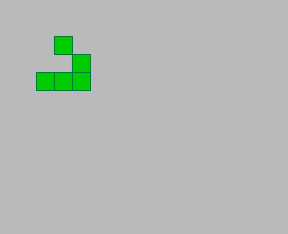
Obviously, this is completely outside the range of acceptable performance. In fact, it was so bad that if I had a video playing in another window, the video would stutter.
The data is structured as a 2d array. If the cell contains a “1” it gets rendered as a green square, if it contains “0” it gets rendered as the background color.
My render loop originally looked like this:
var cx,cy;
var C1=CELLSIZE-1;
for(var x=0 ; x<MAXX ; x++){
  cx=x*CELLSIZE;
  for(var y=0 ; y<MAXY ; y++){
    cy=y*CELLSIZE;
    ctx.fillStyle=gridstyles[ grid[x][y] ];
    ctx.fillRect( cx , cy , cx+C1 , cy+C1 );
  }
}
Where, “grid” contains a 1 or 0 for each cell, and “gridstyles” is an array that has a corresponding style for each possible value of grid.
Troubleshooting and Fixing
You might notice that, given only two possible states, ONE of them, the zero or background state, can be pre-rendered, which is the first thing I tried:
var cx,cy;
var C1=CELLSIZE-1;

ctx.fillStyle=gridstyles[0];
ctx.fillRect(0,0,MAXX*CELLSIZE,MAXY*CELLSIZE);
ctx.fillStyle=gridstyles[1];

for(var x=0 ; x<MAXX ; x++){
  cx=x*CELLSIZE;
  for(var y=0 ; y<MAXY ; y++){
    cy=y*CELLSIZE;
    //ctx.fillStyle=gridstyles[ grid[x][y] ];
    if(grid[x][y])
      ctx.fillRect( cx , cy , cx+C1 , cy+C1 );
  }
}
The reason I didn’t do this originally, is that I intend to run more complex simulations later, and therefore it won’t necessarily benefit me later to pre-render the background.
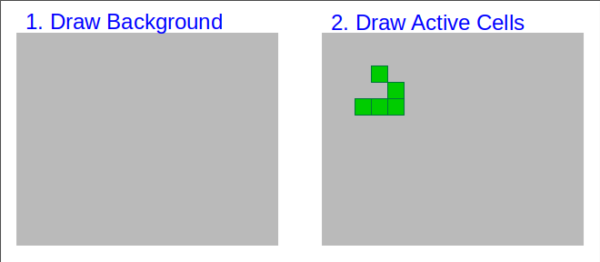
The above should have given me a huge performance boost, but didn’t. Instead, I started getting these weird blobs (and insignificant performance benefit):
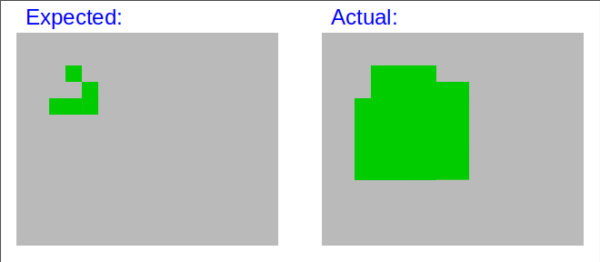
I even tried off-screen rendering, where oscanvas / osctx is an off-screen canvas / context:
osctx.fillStyle=gridstyles[0];
osctx.fillRect(0,0,CWIDTH,CHEIGHT);
osctx.fillStyle=gridstyles[1];

for(var x=0; x<GWIDTH; x++){
  cx=x*CELLSIZE;

  for(var y=0 ; y<GHEIGHT; y++){

    if(grid[x][y]==1){
      cy=y*CELLSIZE;

      osctx.fillRect(cx,cy,cx+C1,cy+C1);
    }
  }
}

ctx.drawImage(oscanvas, 0, 0);
In this case, all drawing steps are performed on the “off-screen” context, then the last step is to copy the bitmap of the off-screen canvas to the visible canvas’s context.
Still no performance gain.
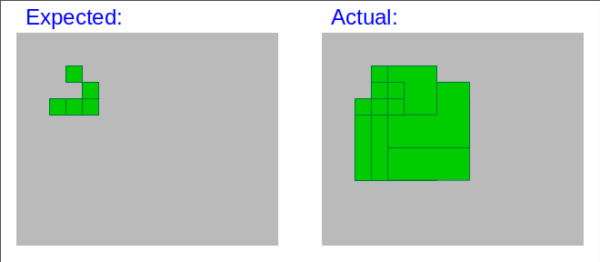
After some troubleshooting, I figured out that the squares were being rendered like this, which gives us a significant clue to what’s going on:
The syntax for fillRect is:
context.fillRect( Xcoord , Ycoord , Width , Height );
I had accidentally assumed the wrong syntax:
context.fillRect( X1 , Y1 , X2 , Y2 );
In my defense, I regularly work with about 8 programming / scripting languages, and some of them use X2/Y2 syntax, but essentially, I was feeding X2 and Y2 in to fillRect instead of width / height.
To put this in perspective, this was effectively painting the same square many multiple times per render frame. Even worse, most of these rectangles were being drawn waaaay beyond the edges of the canvas (on or off screen).
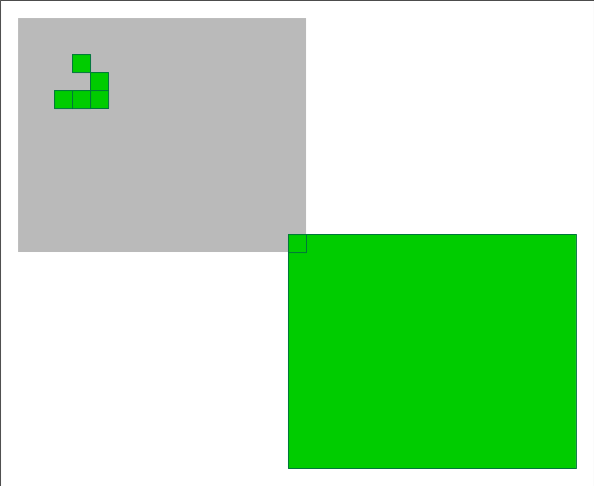
In fact, the lower-right square would actually be rendered as a rectangle slightly larger than the entire canvas!
Originally, when I was rendering both active and inactive squares, by rendering from left-to-right, top-to-bottom, this masked the behavior because each right-hand step nibbled away the trailing part of the previous “square”. Likewise, as each new row began, the progression of that row nibbled away the lower trailing portion of the “squares” above them.
When I pre-rendered the background, the inactive portions of the active squares were no longer being nibbled away.
In short, instead of rendering ( MAXX * MAXY * CELLSIZE * CELLSIZE ) pixels, I was rendering the same pixel hundreds of times in some cases, making it around ( MAXX^2/2 * MAXY^2/2 * CELLSIZE^4/2 ) pixels that were being rendered per frame!
The corrected code looks like this:
ctx.fillRect( cx , cy , C1 , C1 );
Where “C1” is constant equal to (CELLSIZE -1). Yes, I KNOW the optimizer should catch this, but I try not to rely on the optimizer.
Conclusion
ALWAYS double check your syntax :-)
I thought a few people might enjoy reading about my misadventure, so if you made it this far, thank you for reading.