Building Data Centers in space is stupid. Here’s why…
Table of Contents
What is a Data Center?
Since “Launching AI data centers in to space” is an idea, we need to discuss why it’s a terrible idea.
First, let’s talk about what a data center is. I think most people understand the concept, but here is a brief explanation.
A data center is the place where servers “live” and run.
What is a “server”?
A server is a heavy-duty personal computer (PC) with lots of memory and processors. When referring to a PC, some people call the “box” a “CPU” or “processor”, but that’s not correct. “The box” is PC, and the CPU (Central Processing Unit) is the main chip inside the PC. In fact, there’s lots of stuff inside a PC:
- CPU
- Memory
- Hard Drive (storage)
- Power Supply
- Graphics card (maybe)
- Network / wireless card (maybe)
All of this stuff (and more) is connected to the motherboard.
A typical PC might have:
- 1 CPU
- 16 gig of RAM
- Maybe 2 hard drives – a Solid State Drive (SSD – basically a big memory stick) to boot and run, and perhaps a larger drive for archival storage
- PC cost: $500 to $1,500 per unit.
However a typical server has much higher specs:
- 2, 4, or 8 physical CPUs
- 256 gig of RAM
- Multiple drives in a RAID configuration.
- Multiple network controllers
- Server cost: $10,000 to $30,000 per unit.
RAID (Redundant Array of Inexpensive Disks) allows multiple hard drives to act as a single drive while providing fault tolerance.
In a server, network controllers are used to communicate on the network, but can also be used to connect the server to a Storage Area Network (SAN), which is a networked disk array.
Everything in a server is highly fault-tolerant through redundancy. For example, servers can be configured with 2 to 3 power supplies, multiple CPU boards, and multiple network controllers. This redundancy allows a server to lose one or more components due to failure and still operate, but perhaps in a degraded state. For example, if a power supply fails, the remaining power supply (or power supplies) continues to power the system. In addition, most servers have hot-swappable drives and power supplies, allowing the server to be repaired using replacement parts without ever shutting it down.
As you might imagine, extra CPUs, memory, and hard drives, as well as the fans that are required for extra cooling, all use way more power than a normal PC. For example, a laptop (which is a PC) might use 40 Watts of power, and a high-end gaming PC might use 1000 Watts, but a typical server can easily suck down 1300 Watts or more. In fact, a single high-end server can consume more Watts than an electric dryer.
As the number of servers increases, the problem is compounded. You need LOTS of power, and you need a way to carry the resulting heat away from every server so that they don’t fry themselves.
Which is where a data center enters the scene.
Data centers are designed to house hundreds or even thousands of servers, while supplying power, cooling, and network access. Like a server, the data center itself is designed to be highly-redundant, and therefore fault-tolerant. Data centers typically have multiple, redundant paths for network access (internet or private network, or both), redundant power sources, usually with battery and generator backup, and redundant cooling throughout.
- If the data center loses “street power” from the power company, the Automatic Transfer Switch (ATS) automatically starts the generator or generators, and then switches from street power to generator. Meanwhile, the servers continue running on battery power during the entire event. Later, when street power is restored, the ATS switches back and shuts down the generator(s).
- Data centers typically have what is known as “diverse egress” for network connections. If one of them is accidentally cut by road construction (happens more often than you might think), the data center still has its other connection(s) to rely on.
- In order to cool hundreds or thousands of servers, data centers have multiple HVAC cooling systems, so that if a few of them fail, the remaining cooling capacity is sufficient to prevent what’s known as “thermal cascade”, where the other HVAC units can’t keep up with demand, heat builds dramatically, and servers end up failing due to thermal damage.
Beyond network, power, and cooling, data centers also provide:
- Physical security. Data centers are typically staffed with armed guards to prevent physical intrusion, but a good data center is also built like a bunker, with no or minimal windows, concrete and steel walls, perimeter fences with security gates, and internal security controls such as man-traps (not as cool as it sounds), scanners, sensors, lasers, cameras, electronic door locks, keypads, fingerprint readers, and some of the other cool stuff you see in movies.
- Physically resiliency. Although most data centers are NOT designed to withstand a missile attack, MOST are designed to be tornado-resistant, fire-resistant (think California wildfires), flood-resistant, hurricane-resistant, and freeze/blizzard-resistant.
- Fire suppression. If something catches fire inside a data center, which CAN and HAS happened, it must be addressed quickly and effectively. Data centers have special fire suppression systems that are designed to detect and extinguish a fire with minimal damage to the surrounding equipment. Consider, if a server or power supply were to catch on fire, you can’t just hose it down with water – this would be catastrophic to nearby equipment. Therefore specialized sensors and fire suppression gear is required.
At a nominal $20k per server, it would suck to have someone drive up a truck in the middle of the night, and steal a bunch of them. Even worse, the real reason data centers have such tight security, is to protect the data on the hard drives. If someone steals a bag full of hard drives, the potential damage is WAY worse than stealing the equivalent cost in servers, because this could result in the disclosure of bank records, healthcare data, customer lists, trade secrets, and who knows what else.
Likewise, if the data is lost or destroyed, perhaps due to theft, fire, attack, or natural disaster, there could be irreparable harm to the data’s owners.
Therefore, the main reason that data centers are hardened is to protect the data rather than the servers which process the data.
Designing a Data Center
A LOT goes in to planning a data center build, and in order to really understand space data centers, we need to understand those complexities and challenges.
Although everything is based on requirements which vary by use case, anything in Financial Services or Healthcare sectors have some fairly stringent requirements, and I will assume those as a baseline when describing data centers and data center operations. A “general-purpose” data center should be PCI certified, and compliant with GLBA as well as HIPPA.
- PCI (Payment Card Industry) is a credit card industry standard which defines and requires physical hardening as well as strong protections for payment card and transaction data.
- GLBA (Graham-Leach-Bliley Act) is a law which applies to the Financial Services industry, and requires physical hardening as well as strong protections for bank data.
- HIPPA (Health Information Portability and Privacy Act) is a law which applies to the Healthcare industry, and requires strong protections for healthcare data.
If any tenant within a specified data center zone plans to process credit card transactions, that entire data center zone must be PCI certified. Likewise, if a tenant gathers, stores, or processes bank data, there are data center-wide requirements for physical hardening and other forms of physical security. And, if a tenant gathers, stores, or processes healthcare data, some or all of the equipment within the corresponding zone may fall in to scope for the corresponding HIPPA security requirements.
If the data center is intended to host mission-critical applications such as telemetry and support for space missions, or real-time monitoring of patient vitals, the availability requirements are way more stringent. Other use cases, such as hosting government-classified data may require much more hardening. Likewise, a data center hosting only “my pictures of cats dot com”, which has no impact to personal, financial, or healthcare data, and certainly doesn’t host any trade secrets nor government secrets might have much less stringent availability and hardening requirements. And, obviously, lower-end requirements have a much lower associated cost, while higher-end requirements have a significantly higher cost.
Location
But, as they say, it all starts with location, and location is everything.
These are some of the planning considerations when picking a data center location:
- Geographical threat analysis.
- Is the proposed location near any airports, factories, refineries, or other industrial facilities that might cause a hazard of fire, explosion, or chemical release?
- Is the proposed location near any natural hazards, such as a forest that could burn, or a lake or river that could flood?
- Is the proposed location near any tourist attractions, arenas, concert halls, amusement parks, or similar? The thought process is that these could be targets for mass shooting and / or other forms of terrorism. (Not kidding – this is ACTUALLY a question that has come up during a DC risk-assessment)
- Is the proposed location prone to natural disasters (flood, tornado, hurricane, blizzard) and in-land enough to survive a tidal wave?
- Should be close enough to one or more major roads which facilitates delivery of generator fuel and data center equipment, but far enough from all major roads that it wouldn’t be affected by a major crash or accident. Many data centers are built on a slight plateau or employ dirt berms if they are too close to a freeway, for example.
- Needs to be near one or more power substations. If not, the power company will build a substation near your data center, and charge you for it.
- Needs to accommodate network access from various providers, as needed.
- The data center can act as a peering point for multiple providers
- The data center can act as a junction on one or more providers’ networks
- The data center can be geographically near a peering point or provider junction, allowing for the high bandwidth / connectivity requirements
- If the proposed location is too far away from an existing colo/peering point or junction, obtaining fully-redundant, high-bandwidth access may be challenging, and may require that the provider “back haul” a fiber-optic circuit, or preferably multiple fiber-optic circuits from their closest junction to the data center’s location. The longer the back-haul, the more it’s going to cost. And the same is true for each provider you add to the data center.
- Local / City / State zoning, permits, and regulations.
- A data center should be built on a larger piece of land, compared to other commercial real-estate, because you need room for other logistical considerations:
- Perimeter walls and fences
- Berms for resiliency and ditches for water drainage
- Generator pads
- Security gates and barriers
- Secure loading area near the loading dock
- Access for water and refueling trucks
- Segregated parking
- Emergency vehicle access
Despite being designed with resiliency in mind, stuff happens. What special equipment and training are required for data center staff responding to things like:
- Exterior fire: What if a generator fuel tank catches on fire? What if there is an uncontrolled wilderness fire (A.K.A. California)? What if a car in the parking lot catches fire?
- Interior fire: What if there is a fire in the battery room (happens more often than you would think)? What if a piece of equipment catches on fire? What if a fire starts in the break room?
- Flood: Despite geographic location, water tanks can leak, and hurricanes are a thing. How do you keep water out of the building? After water enters the building, how do you keep it away from the equipment?
- Inclement Weather / Extended Freeze: What if the roads are buried in snow or covered in ice? How do you rotate staff? How do you get fueling trucks in and out? Do you have cots, provisions, and showers for trapped data center staff? Do you have enough generator fuel for an extended freeze? Is there a way for Emergency Response units to reach the data center? For example, could a helicopter land on the roof, in the event that staff evacuation is required?
- Medical Emergency: Some aspects of data center operations can be dangerous. In a worst-case scenario, data center operations staff could get cut, burned, electrocuted, poisoned, asphyxiated, crushed, pinched, stabbed, or suffer a fall or have limbs broken. Addressing these types of injuries go WAY beyond the limits of a typical first-aide kit. Does your data center have AED’s, burn kits, oxygen tanks, and trauma kits? Are staff trained to use them? Is there express entry for fire and medical?
Any special equipment or gear, and some aspects of the building itself may require extra land and special permits.
Property Orientation and Layout
Once you have enough property in the correct location, the next thing to consider is how that property is situated and oriented near a main road.
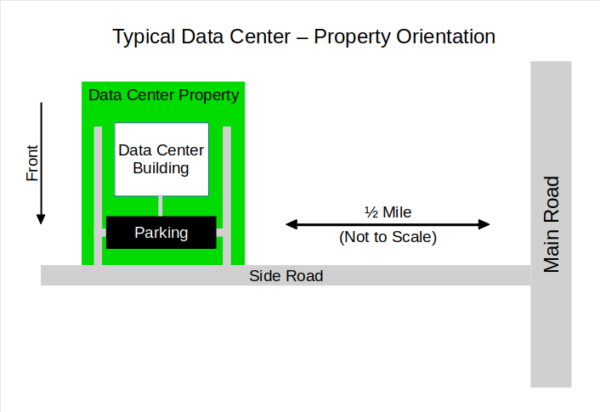
The data center should be located about 1/2 mile from the nearest main road, with its front facing the side road. If there are nearby risks, such as a busy road or active businesses, a dirt berm outside the main wall is recommended. A dirt berm is a good way to mitigate damage due to crashes, accidents, fires, bullets, and also deters trespassing.
The property layout, as well as the data center itself, is designed around “defense-in-depth”, which means that the data center as well as the property around it implements many layers of security, rather than one single “impenetrable” security layer.
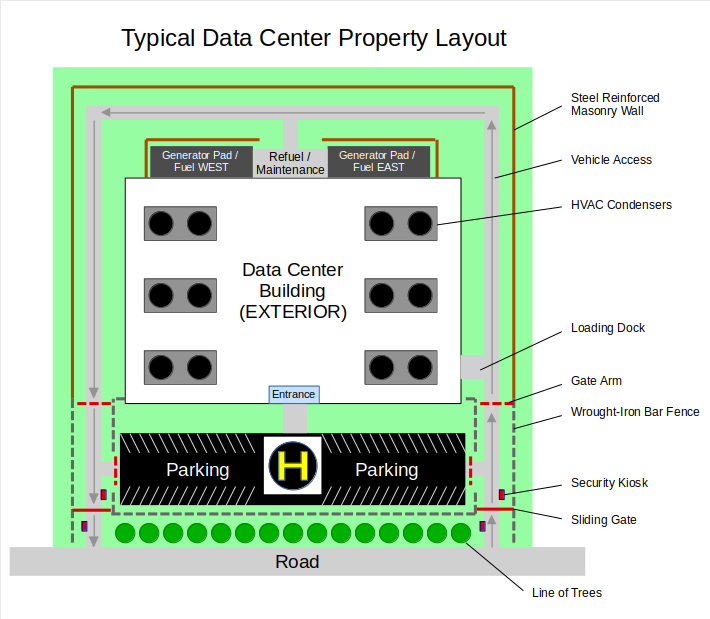
Data centers may implement some or all of the following features:
- Exterior, steel-reinforced masonry wall: A 8′ to 10′ wall around the sides and back of the main building provides significant exterior resilience against crashes, fires, bullets, etc. If allowed by local law, this wall is often topped with razor wire in order to deter trespassers and thieves.
- Wrought-iron // Steel fences: A 8′ iron or steel fence is typical for the front portion of the property. Although some data centers simply implement a masonry wall on all four sides, the theory behind a see-through fence is that it deters snooping and trespassing. If all you can see from the street is a wall, natural curiosity leads you to see what’s behind it. However, if you can SEE through the fence, and all that you can see is a parking lot and a building behind it, you are less likely to want to snoop. By showing you that there is literally nothing to see, you are less likely to look.
- Line of trees near the road: Trees are a natural, resilient, physical barricade, but also offer partial privacy. By adding street appeal while allowing line of sight from the road, psychologically, it makes the building less-interesting.
- Two property entrances: Sometimes, there is a front and a rear, or in other cases both entrances connect to the same road. There is usually a “U-shaped” driveway surrounding the main building, connecting both entrances. In some cases, both entrances are used for both ingress and egress, but my opinion is that one should be primarily ingress, and the other should be primarily egress. However, in the case of a gate failure or other blockage, both entrances can serve both purposes.
- Encircling driveway: A driveway encircles the building, allowing access to the loading dock(s), as well as allows fuel, water, and maintenance trucks to access the generator pads. The driveway is far enough from the building that a vehicle fire won’t damage the building or equipment, and such that a disabled or parked vehicle can be bypassed.
- Sliding gates: A sliding gate is implemented at each entrance. Access is granted via a security kiosk for both ingress and egress. The security kiosks allow badged entry for regular employees, and allows visitors to contact the security desk at the entrance vestibule. In order to get in that gate, you must have a badge or you must be on the visitor list. Otherwise, you are turned away. If you refuse to leave, they lock the gate down and call the cops. Most data centers require that you also must swipe your badge to leave the property, and guests to contact the security desk again. This is done to prevent an attacker from triggering a “REX” (Request to Exit) sensor, then using the exit as an entrance.
- Gate Arms: Once you get past the perimeter gates, gate arms allow you access to the parking lot, loading dock, and generator pads. All of this is monitored by the security desk, where a guard raises the arm(s) when needed.
- Spur fences or concrete bollards: Spur fences and / or concrete bollards block traffic from the driveway to the entrance, and from the parking lot to the entrance. Concrete bollards can be disguised as decorative planters.
- Emergency Staging Area: I’ve been to two data centers that have part of the parking lot sectioned off… 40×40 foot to be used as an emergency helicopter landing pad, or police / fire / medical emergency staging. A “true” landing pad needs an additional clearance of 40 feet on each side (120 x 120 feet), not depicted.
- Generator Pads: Toward the back of the building, generator pads house diesel generators used for power redundancy, along with fuel tanks, and also water tanks depending on the type of cooling employed inside the data center. Each generator pad is surrounded by an additional steel-reinforced masonry wall to protect against fire / explosion.
- There are very few windows: The security vestibule may have glass doors, and there might be some offices at the front of the building with small windows. Other than that, there are no windows anywhere else. Not only is UV light bad for most electronic equipment, but a window is a hole in an otherwise-secure wall. In many cases, data centers use clear acrylic resin rather than glass.
Main Building Layout
As you arrive at the data center, you turn in to the property and pull up to the security kiosk. You press the button, and talk to the guard. You state your name and your reason for being there. After a few seconds, the gate opens, and the guard tells you to turn left in to the parking lot. You pull forward, and the guard raises the gate arm, allowing you to turn left in to the parking lot. You find a parking spot, and walk toward the data center entrance, passing a giant “H” painted inside a 40×40 foot square in the center of the parking lot. As you open the door to the security vestibule, you notice that the doors and windows are thick, but not heavy. On your left is the security desk behind thick glass, which you assume to be bullet-resistant, as well as the security guard that you spoke to a few moments ago.
Here is the layout of a typical 20,000 to 40,000 square foot data center.
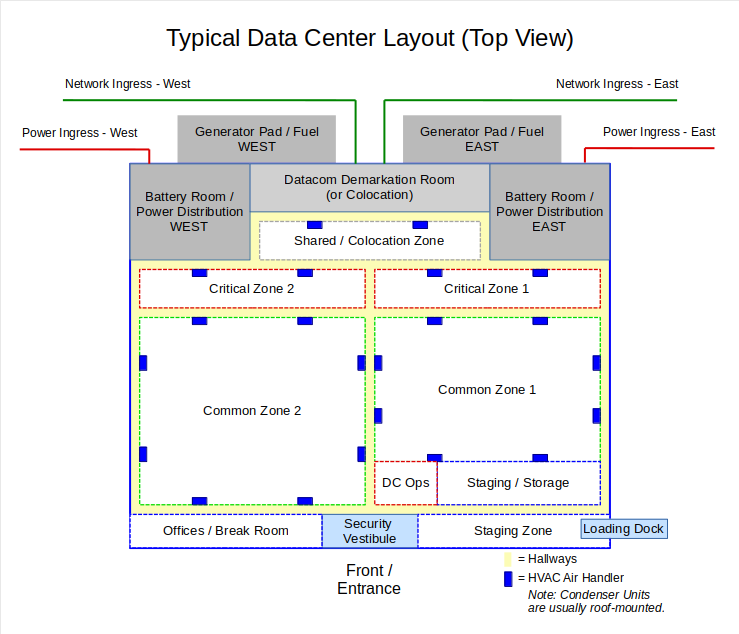
Generally, the building is designed with the least-secure areas toward the front of the building, with increasing levels of security as you move toward the back.
At the front, there is the security vestibule, where you must sign in and state the reason for access, your finger print will be scanned, and you will receive a guest badge that must be returned at the end of your visit. You enter the outer hallway through a man trap. Sometimes the vestibule itself is a man trap, in other cases, the man trap sits between the vestibule and the hallway. A “man trap” is not as cool as it sounds. It’s simply a set of interlocking doors, such that only one door an be opened at a time.
Past the man trap is a common hallway. Every room beyond this point requires some combination of PIN, password, badge, and fingerprint in order to gain access.
The front of the building usually houses low-security areas, such as:
- Offices
- Break room
- Storage
- Equipment staging areas
- Access to the loading dock
Despite being a very secure area, Data center operations (DC Ops) is also usually near the front of the building. DC Ops is a very secure room where the workers conduct monitoring and operations of the data center. DC Ops is usually very secure, because there are monitors and controls inside that operate:
- All HVAC units
- Street power, generators, power switch gear, batteries, inverters, and power distribution
- Heat detectors, fire detection and suppression gear, which includes life/safety devices such as strobe lights and Emergency Power Off (EPO) switches.
- Cameras, door sensors, motion sensors, etc. (note that the security desk usually has access to these as well)
- Network and infrastructure equipment
DC Ops is basically responsible for keeping everything running. In addition to monitoring for and responding to events, DC Ops also:
- Racks / Un-racks equipment (install / remove equipment)
- Perform module-level repairs, such as replacing hard drives, power supplies, network interfaces, etc
- Perform hardware repairs, such as replacing CPU / memory and other internal server components
- Assist data center clients with various tasks, such as troubleshooting, power equipment on/off, and cabling adjustments
As you move inward, the data center floor space is segmented in to “zones” or “data halls” that are each like a building within a building. Each zone:
- Has it’s own HVAC and air handlers, essentially making each zone air-isolated from all other zones. This is done so that smoke, dust, or other particulate contaminants originating from one zone can’t affect the other zones.
- Has its own power distribution. Although every zone leverages facility-wide redundant power, each zone has feeds from both redundant rails, and power distribution within the zone provides every rack with both rails, and then further distribution within each rack supplies redundant power to each piece of equipment.
- Has isolated heat monitoring, fire detection and suppression. Heat monitoring allows DC Ops to monitor hot spots before they elevate to the level of a fire risk. If needed, DC Ops can remotely power off an entire rack and proactively engage fire prevention or suppression measures.
- Each zone is physically hardened, where the inner walls are brick or masonry with embedded wire mesh. Not only are the walls designed to resist ingress by force, but they are internally and externally fire-resistant.
- Doors are heavy-duty wood or steel, fire resistant with electronic strikes. In a normal office environment, you might notice that secure doors use a big electromagnet, and when you badge in you hear a “ping” when the electromagnet releases the door. These can be forced open. Data doors use electronic strikes which are normally locked, where the strike completely blocks the door latch. When the user badges in, the strike is retracted by a solenoid. Therefore, the doors stay locked even during a power failure.
- Every door has access control, and requires a badge swipe. Least-secure areas such as offices and break room may require ONLY a badge swipe. Other areas may require badge+PIN, and secure areas require badge+PIN+fingerprint. Egress from any area usually requires a badge swipe as well.
- In modern data centers, your badge is also used for RFID-based location tracking. This is done to ensure that visitors stay out of unauthorized areas, but also so that you can be located in an emergency.
There are typically four types of zones:
- Staging zones are usually located near the loading dock. These are low-security zones designed to offload and assemble equipment on its way to being installed in the data center, or temporarily store equipment waiting to leave the data center.
- Common zones are usually multi-tenant zones. In the case where clients own their own hardware, sometimes these spaces are partitioned in to cages, which prevent one client from accessing another client’s hardware.
- Critical zones have unusual high-availability requirements, such as hospital systems, or data center-wide infrastructure. These zones are more secure and prioritized over common zones.
- Shared / Colocation zones are areas where network providers can house network switches and cross-connect with other network providers. Don’t pay attention to the blue box at the bottom of some of the racks. That’s the alleged NSA internet spying device.
At the back of the facility are:
- Battery rooms. Each side of the building has a battery room and corresponding generator pad. Equipment runs from the battery bank, basically a giant stack of car batteries, which is connected to an inverter that simulates 220V AC line power. Feeding the batteries is a transfer switch (ATS) that connects either grid power (“street power”) or generator power. If both are down, the batteries can supply power for a few hours. Incoming power is conditioned via a power conditioner that sits between the batteries and the ATS. Each battery room feeds a “power rail”, and there are two battery rooms, thus two power rails. Every piece of equipment in the facility is connected to both rails.
- Telecom demarcation. The demarcation room is where all network connections “terminate” inside the data center facility. From there, patch panels and cross-connects are used to route various network connections throughout the facility. Inside the demarcation room are equipment such as ONT (Optical Network Terminator), distribution frames, patch panels, and similar. Network connections run underneath the floor in cabling trenches, or over the ceiling on “ladders” that carry cables from one zone to another.
All About Racks
Inside the data center floor space, equipment is stored in 19″ equipment racks.
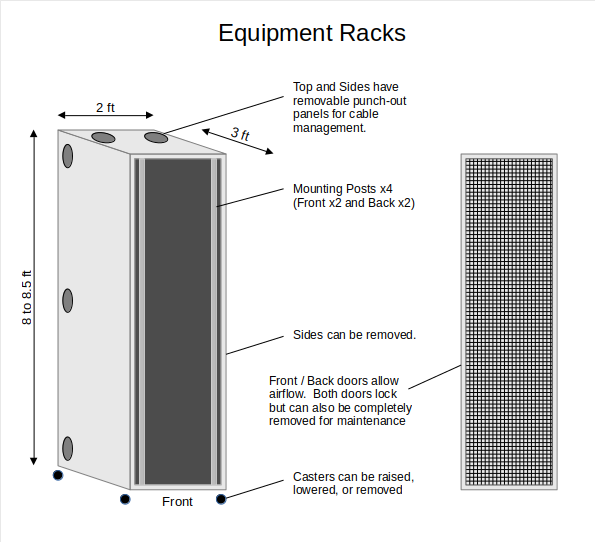
Racks are 2 feet wide, 3 feet deep, and about 8 feet tall.
Equipment racks, along with all rack-mount equipment are designed for front-to-back cooling, where cool air is ingested in the front, cools the equipment inside, and exhausted from the rear.
Equipment racks have four mounting posts, 2 front and 2 rear, that are divided in to 42 “rack units”. Each piece of equipment is like a kitchen sliding drawer that mounts inside.
Racks have removable sides, as well as removable front and rear doors.
There are punch-out panels for wire management on the sides and top.
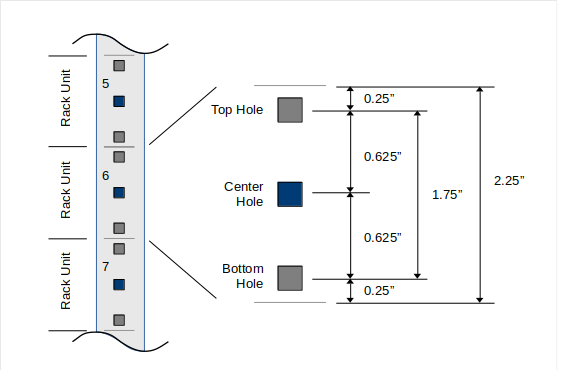
An equipment rack is divided in to “Rack Units” (RU) that are 1.75″ tall, separated by 0.5″. Each RU has a top and bottom hole, and a center hole. The top and bottom holes are used for rails, while the center hole is used to secure the actual device.
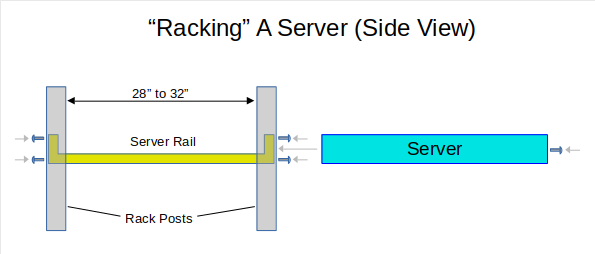
To rack-mount ( “rack” ) a server, you install the rails first, between the front and rear mounting posts. Then you install the server itself.
- Install the rails via the top/bottom holes
- Install the server in to the rails, secured by the middle hole
- Install drives and power supplies
- Connect power and network
Most servers use rails that look like a kitchen drawer slider, but heavy-duty. When maintenance is required, you unscrew the center screw, and slide the server forward. You lift the top panel to gain access to the server’s interior.
Some servers offer rails that “snap in” to an equipment rack, requiring no tools.
Small devices such as routers and firewalls have “mounting wings” that bolt to the side of the device, and use the top and bottom mounting holes on the front posts
Anecdote:
When I was a consultant in the 90’s, many of my clients had “sagging” equipment, where they mounted a 1U switch, router, or firewall using the center mounting hole, and therefore the top or bottom mounting holes on the bracket didn’t line up. When using the top holes of the mounting tabs, this allows downward force to deflect the mounting bracket. The fix? Move the device up 1/2 RU. And, when using only two mounting holes, mount from the bottom. When forced down by gravity, the top holes are cantilevered against the rack’s mounting posts.
Anatomy of a Rack-Mount Server
In a “standard compute” model, a standard 42U rack contains 30 to 40 individual servers, along with network, power distribution, and anything else a healthy, growing server might need.
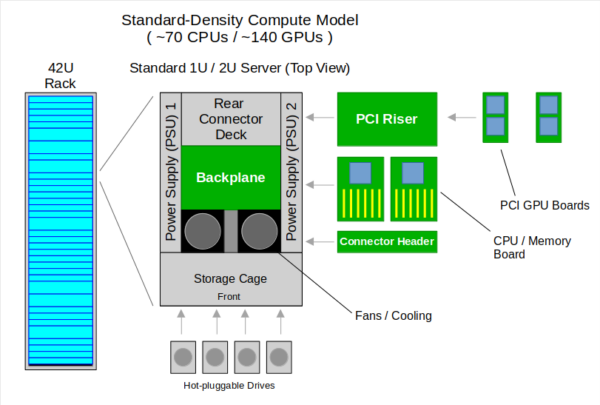
A rack-mount server’s case is like a drawer that slides in and out of the rack once it’s rails are mounted. The server has a sheet metal lid that can be removed once the server slides forward, out of the rack. At the front of the server chassis is where hot-pluggable drives are installed. At the rear are hot-pluggable power supplies, plus network, USB and other ports that are directly attached to the backplane. A server’s “backplane” is like the motherboard for a normal PC, but a backplane has no CPU or memory. The backplane has connectors for CPU boards as well as the PCI riser, where normal PCI cards can be installed. Each CPU board has a physical CPU, plus its associated memory. For AI workloads (which is why we are eventually going to discuss space data centers), the PCI slots would have GPU boards installed.
So, conservatively, one whole rack of “standard compute” has around 70 CPUs and about 140 GPUs.
High-Density Compute
In order to get compute densities above “standard”, you have to use “server blades”.
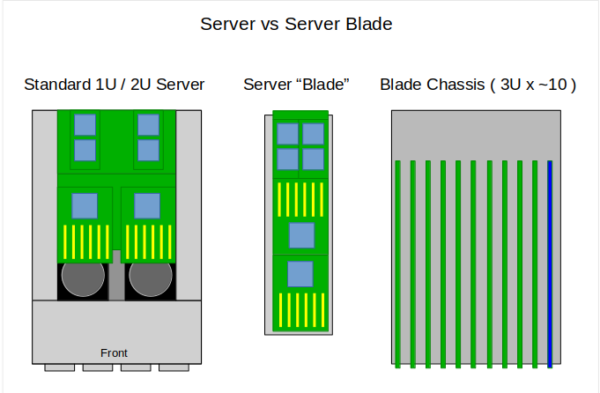
A server “blade” is a giant card that has CPUs, Memory, and GPU all in one package. Multiple blades – around 10 or so – slide in to a blade chassis, and the blade chassis slides in to the rack, the same as a single server.
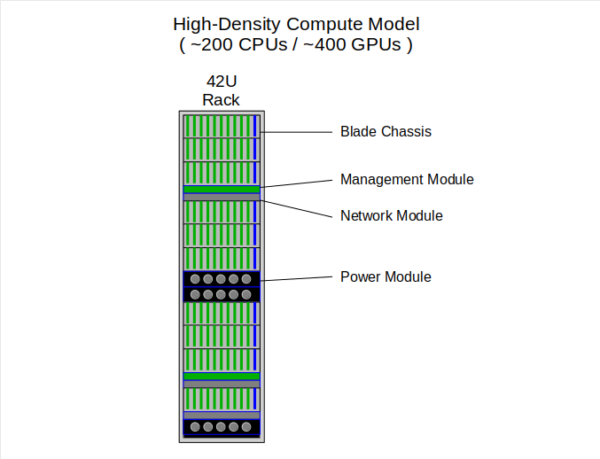
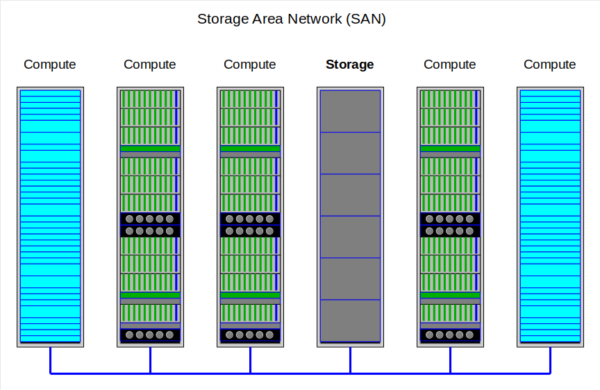
Networking and power are handled by dedicated modules elsewhere in the rack, and storage is handled via Storage Area Network (SAN). In a high-density compute model, one rack houses 200 or more CPUs and 400 or more GPUs, or nearly triple the density of a “standard” rack.
 ‘
‘
As mentioned, all of these servers use Storage Area Network (SAN), rather than local hard drives. Each SAN array has many hard drives that are grouped in to RAID arrays. These RAID volumes are further partitioned in to logical volumes, and logical volumes are connected to each server via the SAN. Each server might have a small boot drive, but once running, stores all of its data to the SAN.
The SAN is also capable of managing “storage snapshots”, which is a way of creating a point-in-time backup of any volume, and is also a convenient way for the backup system to back up each server:
- A snapshot is created
- The backup system copies the snapshot
- The snapshot is removed
Data Center Floor Layout
On the data center floor, racks are arranged very specifically.
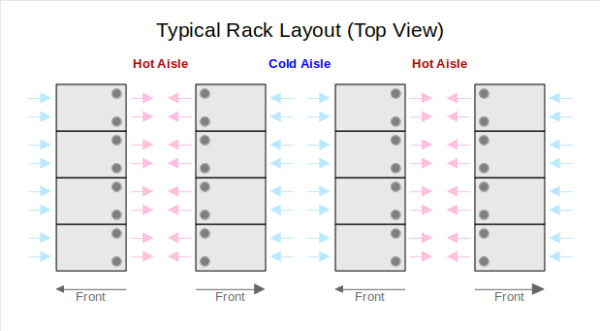
Alternate rows of racks face eachother, while the back of each row faces the back of the next row. Since every rack cools from front to back, this forms cold aisles where the fronts face eachother, and hot aisles where the backs face eachother. This scheme depends on the data center’s cooling ability, to remove heat from all of the hot aisles. This can be accomplished in a number of ways, such as HVAC return vents above hot aisles.
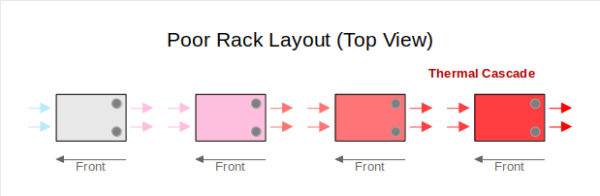
If all racks faced front to back, this causes thermal cascade, where the air is heated more as it passes through each rack, and the last rack in line has insufficient cooling to prevent hardware damage.
In addition to thermal considerations, every piece of equipment in the data center has what’s known as a “maintenance clearance”, which is the area around it required in order to provide normal maintenance. Typically maintenance clearances are required for removable panels, or to provide room to slide a component out of the main housing. Racks typically have a 3 foot clearance front and back, which corresponds to the rack depth but is also ADA compliant.
Data Center Tiers
Data Centers are divided up in to tiers based on redundancy and recovery capabilities.
Normally, we would think of “tier 1” as the best, but actually it’s the worst. A tier 1 data center only has one data path and one power path with no redundancy.
Data centers go up to tier 4, where tier “n” is “n” redundant power and network paths. Most data centers are tier 2 or tier 3. I’ve been in a tier 4 data center ONCE.
Nut Shell
In a nut shell, everything discussed above is a factor or consideration when designing and operating a data center.
Space Data Centers
Now that we know how Earth data centers work, let’s talk about how “space data centers” would work, especially in the context of AI.
The first limiting factor is payload. You can only send as much stuff in to space at a time that your rocket can carry in a single launch.
Looking at the latest Falcon 9 spec sheet, it can carry 25 tons to Low Earth Orbit (LEO) or about 10 tons to Geo Transfer Orbit (requires higher velocity, thus more acceleration, thus way more fuel). Depending on what you are trying to accomplish, LEO is designed for a “constellation” of satellites that make rapid passes across the Earth’s surface, multiple times per hour. For example, GPS is deployed in LEO because it doesn’t matter WHICH satellites you can see at any given time. We have to assume that the goal of a data center would be geosynchronous orbit, because a data center that’s only accessible part of the time is only useful part of the time. So that limits our payload to about 10 tons.
Standard compute weighs about 100lbs per RU, which is 4500 to 5000 lbs for a fully-populated rack, or about 2.5 tons. However, the high-density compute used by AI is like 2.5 times that! If we conservatively guess about 2x weight, that would be about 10,000lbs or about 5 tons per rack for high-density compute, meaning that each trip can carry about 2 racks’ worth of equipment. Batteries, also, are quite dense and would require multiple trips.
Therefore, the best approach would be to build the shell based on a modules. Each “module” would be based on 5m diameter x 15m tall (about the payload size of the Falcon 9), and might possibly unfold or some slight assembly may be required once in orbit. Subsequent trips would populate racks within the modules, and it’s assumed that each rack is pre-populated with server equipment.
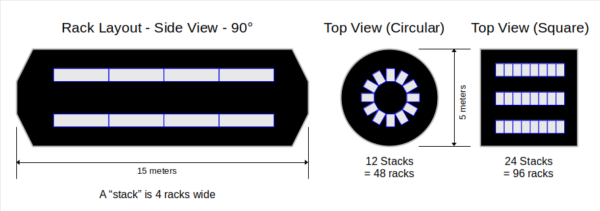
In a round module, assuming maintenance clearance for both the front and back of each rack, you could stack 4 racks on “top” of eachother (depicted side-by-side above), in a circular configuration. This would yield about 12 racks per tier, 4 tiers deep, or about 48 racks.
One of the problems with stacking square things inside a round container is the massive amount of wasted space. Therefore, in contrast, a square (ish) module could easily hold double the amount of racks, and therefore double the equipment in about the same volume. Again, the corners could easily unfold during deployment.
Guessing about the configuration, a “space data center” might have multiple modules tied together.
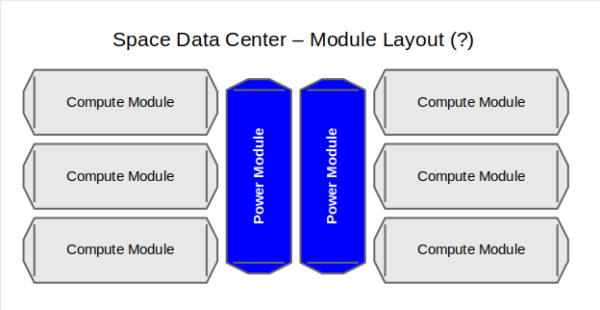
Power modules in the center would be dedicated to batteries and other power-switching equipment, with “compute” modules attached on the outsides.
I think the objective would be tier 2, with full redundancy for every component and module.
A Quick Note on Direct Current Power Distribution
Most equipment in a data center runs on Alternating Current (AC 120V to 240V). However, power in a data center comes in from the power company (or generator) as AC, then passes through a rectifier/conditioner, which converts it to Direct Current (DC), where it’s stored in batteries. On demand, electricity is pulled from the batteries (DC), where it passes through an inverter which converts it back to AC. As the AC power enters each device, it’s power supply converts it BACK to DC!
We could just run all of the equipment on direct (conditioned) DC!
This depends on distance from the power distribution gear, because DC voltage drops as a function of cable length. However, in a relatively compact configuration, everything can be driven from direct DC. In fact, some data centers do this today, and some server / equipment manufacturers even offer 48VDC power supplies as an option.
This is like 15% to 20% more efficient than converting back and forth multiple times, and creating unwanted heat in the process.
Problems With Space Data Centers
Now that we’ve looked at what an “Earth” data center is, and can speculate about how a “space” data center would work, let’s look at all the problems that need to be solved.
Cost is a Problem
The first and largest problem is cost.
For the purposes of putting a stake in the ground, let’s assume each compute module would be equivalent to about 1,000 square feet. Here’s how we arrive at this:
- In our model above, we deployed 96 racks per compute module.
- Each rack is 2′ x 3′, plus another 2′ x 3′ (average) for maintenance clearances (which are also cooling clearances, by the way)
- Therefore 96 racks plus their maintenance clearances would require 1,152 (or about 1000) square feet
A modern, 20,000 sq-ft data center costs $20M to $40M, and would be the equivalent of about 20 “space data center” compute modules.
ONE Falcon 9 launch costs $75M.
We can make some assumptions and then extrapolate:
- Each compute module requires the shell, plus 96 racks of equipment
- We can assume that other supporting gear, such as power distribution, network connectivity, and cooling is baked in to the racks, the module, or both
- Assuming that the max weight load is accurate (10 tons) and around 4 tons per rack, that’s 2.5 racks per trip
- The per-module total would be around 40 launches for the equivalent of 1,000 square feet.
Additional launches…let’s be conservative and say 100 additional launches would be required for batteries (being VERY generous)
Grand total:
- 40 launches per module x 20 modules = 800 launches.
- 100 additional launches for batteries
- 900 TOTAL launches times 75 million = $67 BILLION
$20 MILLION on Earth = $67 BILLION in space. Even if we double the Earth cost and cut the space cost in half, that’s still 3 orders of magnitude of cost difference.
Life Span and Life Cycle are both HUGE Problems
An Earth-based data center facility… the building itself… practically lasts forever, but we can put a number on it, for example 100 years. The building itself is made out of concrete that will last for as long as it’s properly maintained. Buildings such as the Roman Colloseum are proof of that. And during its useful life, a data center building can be completely gutted and retrofitted with modern technology as often as necessary without incurring 100% renovation cost. It might be like 20% renovation cost.
$40M plus three $10M renovations = $70M total cost over 100 years (or whatever).
In contrast, a giant, glorified metal shack in space is going to degrade over time. Every bump, ding, or micro-meteorite reduces its useful life, just like owning a car. Likewise, any data center facility is one technological innovation away from obsolescence, but unlike an Earth-based data center, it would be cheaper to rebuild than re-fit.
So let’s be generous and cap the space facility itself at 20 years’ life span. This would bring us to the point where aggregate damage plus some technological innovation makes the old facility obsolete, and it would now be cheaper to build new than re-fit / retrofit.
The next issue is equipment life cycle. Any server equipment ages in dog years. 7 is OLD, 10 isn’t unheard of, but unlikely. And yes, if well maintained, and assuming you can still find parts for it, you can run a server way beyond 10 years. However, because technological innovation continuously improves the efficiency of new devices and equipment, you can always get double the RAM, double the CPU, double the GPU every 3 years (Moore’s Law). So a 10-year-old machine provides 1/8 the computing capability of an equivalent modern machine. Eventually, it COSTS TOO MUCH to run the old machine, assuming you can even find parts to keep it running that long.
However, with AI using high-performance compute, servers age out at about 3 years. It’s not that the hardware is no good, it’s just too expensive to operate.
Therefore, you have to have a plan for 100% equipment replacement over 3 to 4 years. So that’s another ~200 launches per year, just to keep the equipment current, whether that’s launching new modules or replacing server racks with newer ones.
Form Factor is a Design Problem
Unless you design your own equipment and a custom rack system, EVERY piece of data center equipment is designed to be mounted within a 19″ rack. This means that your data center MUST be designed around a standard 3′ x 2′ x 8′ form factor.
Further, the racks and the devices within them are designed to have maintenance clearance in front and back to perform installation / repair / service / removal.
Cooling is a HUGE Problem
On Earth, data centers are cooled by some combination of air and water. Maintaining pressurization in an unmanned data center through the course of its useful life is extremely difficult. Therefore, we have to assume that the cooling strategy is NOT going to use atmosphere.
On Earth, air and water carry heat, which is known as convection. All modern servers and other data center equipment are cooled by either air or liquid convection.
- CPUs, memory, and other components turn electricity in to heat, minus the actual work done.
- Conduction transfers heat energy from the surface of the component in to the surrounding air (or liquid, if liquid-cooled).
- Convection carries hot air / liquid out of the device by pumping cool air in to the front of the device, resulting in hot air exiting the rear of the device.
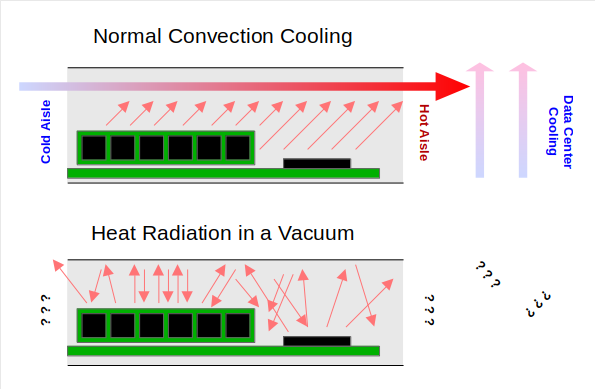
However, in space, without atmosphere, the only way to eliminate heat is for that heat to be radiated as infrared light. And without air flow, that heat energy just bounces around inside the server’s case.
Moreover, racks can develop “hot spots” if one piece of equipment is “boxed in”.
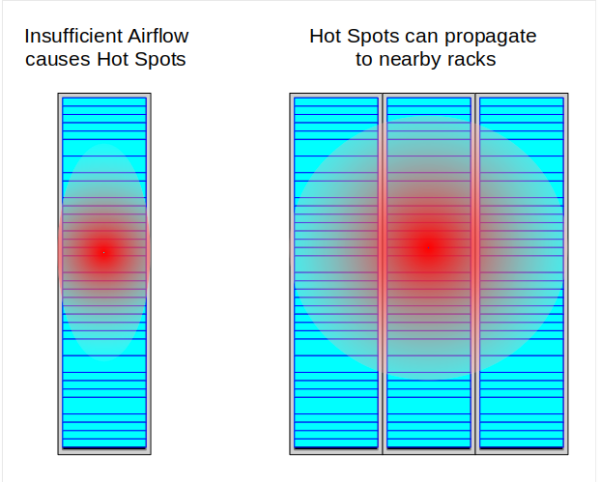
Hot spots can propagate to nearby equipment, and equipment in nearby racks. Therefore, cooling via direct radiation isn’t feasible.
Liquid cooling is more thermally-efficient than air, but can only cool specific components unless the entire server is submerged in oil or something.
Heat pipes are always an option – heat pipes are sealed and use a combination of oil and inert gas to “move” the heat from components such as a CPU to the exterior of a device, where a heat sink could radiate some of the heat. However, even heat pipes are dependent upon some kind of exterior cooling in order to work efficiently.
So…how do you cool stuff in space without atmosphere? Or even worse, how do you MAINTAIN atmosphere for 10 to 20 years?
Atmosphere and Humidity (Lack Thereof) is a Problem
This is not commonly known, but most Earth-based electronics are not designed to run in the vacuum of space, and might not run at all. Most devices don’t give a crap about gravity, despite what you saw in the movie, “Hail Mary”. HOWEVER, air is a dielectric. On earth, air permeates every device, providing an insulating barrier that prevents arcing and shorting between electrical traces on circuit boards. To run reliably in a vacuum, an electronic device has to be specially designed to prevent this.
Further, many high-speed / high-frequency devices can’t run properly or reliably in extremely low humidity. You would think that data centers are kept as dry as possible, but the reality is that most equipment won’t operate reliably under about 5% humidity. In fact, most data centers are kept at around 15%, and some have to employ humidifiers if the regional, ambient air is too dry.
Some Equipment Won’t Survive Launch
Launching in to orbit is a violent process. It’s pretty much the opposite of being driven somewhere in the back of a Mercedes. Everything is under extreme acceleration for a long duration, and subject to extreme bouncing and shaking, which is a byproduct of travelling at high-velocity through the atmosphere.
Conversely, data center equipment is designed to be delivered by truck, unpacked, racked, and sit there motionless (more or less) until it gets decommissioned at some future point.
I’ve done data center moves where we ship the equipment on a truck – nothing remotely similar to a rocket hurtling through the atmosphere at 9g – and servers had loose memory, loose PCI cards, and even loose CPU boards. Hard drives are held in by clips, but I’ve seen those shake loose.
What’s the moral of the story?
Either fabricate custom mounting clips for every component, or be sure to re-seat every component in every server after entering a stable orbit, and prior to deployment.
Further, Earth data centers don’t move (relative to the equipment). Space data centers may need corrective trajectory adjustments, which means acceleration, which means that components can be jostled, which means that jostled components could become unseated, even after deployment.
Maintenance is a Huge Problem
Every component inside a server will fail eventually.
Although there is no specific timeline for 100% failure for each component, there also isn’t a guaranteed minimum service life. Instead, each component has sort of a “half life” called the Mean Time Between Failures (MTBF) which is a “good guess” about the maximum service life. Mechanical components, such as fans and power supplies have a much lower MTBF than solid-state components such as CPUs and RAM chips.
So a brand new hard drive with a MTBF of around 3 years could fail within a couple days, or it could last for 6, and there is no way to determine which one you have. A brand new power supply with a MTBF of 24 months could fail tomorrow, or it could run just fine for 4 years. And, there is no guaranty of failure. It just becomes more likely as time progresses.
In fact, the best practice for installing new equipment is to establish a “burn-in” period – an amount of time between the first cold boot until the new equipment is processing production workloads – to ensure that there are no early component failures, or to mitigate them before processing production workloads.
And, there are many factors that affects service life:
- Workload is a huge factor. Servers that process more data require more CPU and memory utilization, and therefore consume more power, and generate more heat.
- Environment is a huge factor. Servers that operate in higher temperatures are more likely to fail.
- Frequent power cycling. Frequent power cycling can degrade power supplies, but can also degrade other components due to “surge voltage” that occurs when a circuit is first energized. This is such as significant consideration that often, experienced IT staff are reluctant to power-cycle old equipment, opting instead for a soft reboot if possible. You sit there biting your nails, wondering if this was the device’s last power cycle.
- Hot / Cold cycles. It was common in the 80’s and 90’s to find that components held by friction (at the time, BIOS, RAM, CPU, and ISA/EISA boards) could migrate over time due to heat expansion followed by cooling contraction. During this period “re-seating” (making sure everything was seated properly) was a common troubleshooting method. So to make this clear, some percentage of the time, you could fix a PC or server just by re-seating all of its components. However, even today, in the age of clips and fasteners, hot/cold cycles can still cause components to migrate. Or, cooling cycles can cause corrosion between components, which can cause “dead spots”, where re-seating the component (such as a stick of RAM) can bypass the corrosion. This is why most standby hardware is kept in a “warm” state – powered on, but not in use.
- Age. As components age, broken solder joints, migration, and internal heat damage become more likely. The longer something runs, the more likely it is to fail.
Understanding all of this, the reality is that components can fail at any time. In fact, the more components you have, the more likely that a random failure will occur.
Anecdote:
I once toured a data center. I won’t share when, which one, which company owned it, or where it was located. The company who owned it BRAGGED for months about how resilient their data center is, and how if we let them host our workloads, we would never have to worry about anything. They cited power resiliency, and even that their data center free-floated on a pad of diesel fuel, providing isolation from seismic events. But when we actually toured the data hall, we saw rack after rack with random orange lights. At the time, and for the particular brand of equipment in use, orange = failure. A failed drive had an orange light. A server with a failed component had an orange light. What this meant was that there was a pattern of negligence, where no one was monitoring the hardware, and no one was “walking” the data center.
One of the first policies that I established, the first time I managed a data center, was to have a specific person whose responsibility was to walk through the data center every day looking for failures or anomalies. This accounts for situations where you have a potential hardware issue or environmental issue that monitoring didn’t catch for some reason. In addition, that person’s responsibility included removing trash, looking for stray cables (midnight cable changes), unlocked cabinets, and any other anomalous situation that might result in a power, network, or equipment failure.
Over the years, I had several clients who adopted this practice after taking a tour of my data center(s).
To some extent, most equipment can be configured with redundancy:
- Power supplies can be redundant. If one fails, the other(s) take over the load.
- CPU boards can be redundant. If one fails, the workload is shifted to the remaining CPU board(s), but perhaps in a degraded state.
- Network and SAN connections can be redundant, supporting a failed, link, interface, board or switch.
- Firewalls, routers, and load balancers can be deployed in redundant pairs or “availability groups”, where an entire failed device is automatically mitigated by the remaining devices.
- Storage can be deployed in RAID groups, where a failed drive or an entire RAID array is redundant and therefore fault-tolerant.
However, over time, failures add up. Without human intervention to replace failed modules, servers become less reliable over time.
In space, there are no daily walk-throughs, nor operations staff to replace failed equipment.
Beyond servers and other rack equipment, what about:
- Failed batteries?
- Failed power regulators / conditioners / distribution nodes?
- Interfaces and cables? (yes, even a cable can fail)
- Cooling?
What about a simple hole in the wall caused by a micro-meteor? Or a degraded door seal?
And, keep in mind, repairs depend on stocking spare parts. Where do you store the spare parts, and how do you access / deploy them?
Physical Resiliency is a HUGE Problem
In the comedy show “Space Force”, a chinese satellite is depicted using deployable arms to sever the solar panels off of an American satellite.
Although this isn’t realistic, what IS realistic is that an Earthbound data center and its air space is protected by the entire US military. A spacebound data center is a tin can that can be taken out by a proverbial BB gun.
Because china’s industry intersects their government, essentially there is no difference between industrial espionage and governmental espionage. If china decides to “accidentally” fire a missile in to your $30 BILLION space data center, there isn’t shit you can do about it.
High-Energy Particles (“Cosmic Radiation”) are a HUGE Problem
HOOO boy.
What is “radiation”?
In essence, any particle.
Photons, neutrons, electrons, protons, neutrinos, muons, leptons, sesame-street-ons.
In empty space, free particles zip around at nearly the speed of light, and can erode metal or disrupt electrical circuits. Even if you employ electrical shielding, non-charged particles such as neutrons or neutrinos can randomly interact with unprotected electrical circuits, disrupting logic and producing irrational and/or inconsistent computational outcomes.
On Earth, we have tremendous shielding against this, called “the atmosphere”.
There are strategies to block cosmic radiation, such as to employ exterior water jackets, where water flows through the exterior wall, and the density of water helps absorb unwanted cosmic particles.
But…water is heavy. Weight = cost.
Bandwidth is a Problem
Data centers process a lot of data. In order to do that effectively, you have to move a lot of data in and out of the data center. In order to do this effectively, you need to move data quickly, which means more bandwidth = more efficiency.
Earth data centers have OODLEBITS (not a real word) of bandwidth. HUNDREDS of gigabits of bandwidth.
If space data centers are depending on Starlink, the raw bandwidth isn’t even going to be close to what you can deliver to an Earthbound data center via fiber optic cables.
Power is NOT a Problem
Assuming solar is the primary power source, and adequate battery capacity to run at night, power kind of solves itself.
Solar -> Panel -> Regulator -> Battery -> Conditioner -> PDU -> Server, DCV the entire trip.
Panels and batteries have to be regularly replaced, but… if you just spent $67 BILLION on around 900 launches, what’s a couple $bil more?
Conclusion
Data centers in space is stupid.
- 1,000 times the cost, no benefit
- The only way to address life span of the facility is to replace the facility
- The only way to address equipment life cycle is to continuously replace equipment
- ALL modern data center equipment is designed for 19″ racks, which presents a significant design / cost constraint.
- How do you cool equipment in space without heavy (and therefore expensive) liquid cooling, or pressurized atmosphere?
- Without atmosphere and humidity control, how do you ensure that electronic components operate consistently and reliably?
- How do you ensure that equipment designed to work on Earth won’t be damaged during launch?
- How do you harden a space data center against physical attacks, especially from space-faring, hostile countries? Like, china?
- How do you perform routine hardware maintenance?
- How do you block cosmic radiation?
- How do you provide consistent, latency-free, bandwidth?
Data centers in space is a great plot for a campy Muppets sci-fi movie, but not a good solution for the real world with real workloads.