I went down a rabbit hole trying to add a “favicon” (Web page icon) to an ESP32 web server project.
No one seems to have a complete answer, so here you go!
UPDATE: After I clicked “Publish” on the original version of this article, I started running in to all sorts of problems with my ESP32.
This sent me even deeper in to the rabbit hole, but I ultimately found a good solution.
Here is a step-by-step walk-through (UPDATED).
Table of Contents
Summary
Building a web server on ESP32 is super simple, and is a great way to build a quick and dirty UI for most projects. In fact, I’m using ESP32 as the basis for v2 of my gate opener web interface.
HOWEVER, when you open the site in a browser, it makes a request for favicon, which is the “Favorite” icon – the website’s icon that will also be displayed in your bookmarks (used to be called “favorites”) list.
Since there are no files, the request to “/favicon.ico” fails with 404.
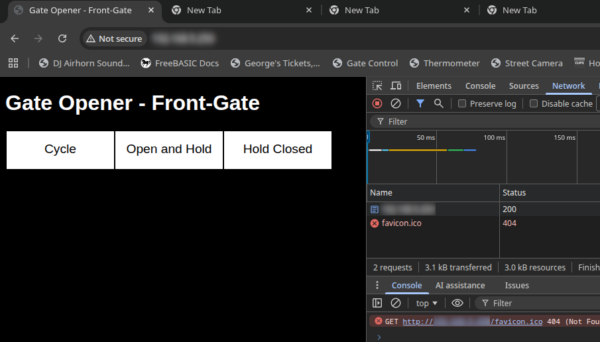
I don’t know why this bugged me, LOL! But I thought about it a bit and decided I wanted an icon.
Step by Step Solution (SVG)
Overview – add an icon <LINK> pointing to a SVG file. Then add a webserver handler to serve the SVG file.
SVG is a text-based, vector-based format.
- Go design / draw / photograph your website icon. Save as or convert to SVG format. Save as favicon.svg.h.
- Add favicon.svg.h to your project.
- Include favicon.svg.1 from your INO file:
#include "favicon.svg.h"
- Edit favicon.svg.h to turn it in to a c variable declaration:
const String favicon_svg = F(R"=====(<?xml version="1.0" encoding="UTF-8"?>
<!DOCTYPE svg PUBLIC "-//W3C//DTD SVG 1.1//EN" "http://www.w3.org/Graphics/SVG/1.1/DTD/svg11.dtd">
<svg version="1.2" width="152.4mm" height="152.4mm" viewBox="0 0 15240 15240" preserveAspectRatio="xMidYMid" fill-rule="evenodd" stroke-width="28.222" stroke-linejoin="round" xmlns="http://www.w3.org/2000/svg" xmlns:ooo="http://xml.openoffice.org/svg/export" xmlns:xlink="http://www.w3.org/1999/xlink" xmlns:presentation="http://sun.com/xmlns/staroffice/presentation" xmlns:smil="http://www.w3.org/2001/SMIL20/" xmlns:anim="urn:oasis:names:tc:opendocument:xmlns:animation:1.0" xml:space="preserve">
<defs class="ClipPathGroup">
<clipPath id="presentation_clip_path" clipPathUnits="userSpaceOnUse">
<rect x="0" y="0" width="15240" height="15240"/>
</clipPath> <clipPath id="presentation_clip_path_shrink" clipPathUnits="userSpaceOnUse">
<rect x="15" y="15" width="15210" height="15210"/>
</clipPath>
</defs>
...
</g>
</g>
</svg>
)=====");
Note: XML must begin ON THE SAME LINE as the variable declaration. If not, the browser complains about XML not starting on the first line. Cyan text above is the original SVG definition.
- Modify your HTML header to link to the SVG file:
<!DOCTYPE HTML>
<HTML><HEAD>
<TITLE>My App v1.0</TITLE>
<META http-equiv='refresh' content='$DELAY,.' />
<LINK rel="icon" href="/favicon.svg" type="image/svg+xcml">
</HEAD>
<BODY>

// your HTML here

</BODY>
</HTML>
- Create a server handler to serve out the referenced SVG file:
void setup(){

  //*** Other setup code ***

  //HTTP Server
  server.on("/" , normal_handler);    //this is your
  server.on("/favicon.svg" , handleFavicon);  //favicon handler
  server.begin();

  //*** Other setup code
}

...

void handleFavicon(void){
  server.send(200,"image/svg+xml",favicon_svg);
}
The pay careful attention to the content types – unless everything is configured properly, the browser will refuse it. “favicon_svg” is the variable we are declaring in “favicon.svg.h”.
Why Inline PNG Did Not Pan Out
At first, things worked great. As I started adding more content, I realized that the ESP became increasingly unstable.
After MUCH troubleshooting, here is the problem:
- server.send() writes the ENTIRE document as a single string and sends it back to the client. There is probably a way to break this up in to two or more strings, and then store each in its own variable, but this is way more complicated than using server.send()
- As you build the HTML, every time you use a String function to concatenate or replace, behind the scenes it’s creating a NEW string and then copying all of the data from the other strings.
- With 3000 extra bytes of base64-encoded PNG in there, it was having to copy the icon over and over and over in memory just to serve up a simple application.
Using the code above and SVG format, the response to the client can be much more easily stored in a single variable without thousands of bytes of overhead. When the browser asks for favicon.svg, the extra handler we set up serves it directly from PROGMEM without even having to copy it. Well…maybe the server object copies it in to a buffer, not sure. But WE don’t have to copy it. So even though the client may request it repeatedly, the ESP just keeps serving the same static content, with no string manipulation required.
The other problem I think I was having with sending raw PNG is that I suspect server.send(), expecting a string, can’t handle binary data. Since SVG is explicitly text, it doesn’t have that problem with SVG.
Another nice thing about linking the SVG is that you can test it by going to http://[whateverYourESPipAddressIs]/favicon.svg – this should display the favicon in your browser.
OLD Step by Step Solution (Uses base64-encoded PNG)
Overview – add an icon <LINK> reference containing an inline, base64-encoded PNG to the document header.
- Go design / borrow / draw / photograph your website icon. 48×48 pixels is an appropriate resolution. Save as PNG format or convert to PNG. The rest of the steps assume the icon file is saved as favicon.png.
- Convert to base64.
base64 favicon.png > favicon.h
- Add favicon.h to your project. Be sure to add “include” to your main INO file:
#include "favicon.h"
- Edit the base64 file (favicon.h) to add a variable declaration and HTML syntax:
const String favicon = F(R"=====(<link href="data:image/x-icon;base64,
iVBORw0KGgoAAAANSUhEUgAAADAAAAAwCAMAAABg3Am1AAAAwnpUWHRSYXcgcHJvZmlsZSB0eXBl
IGV4aWYAAHjabVDBEcMgDPt7io4AyBB7HNKkd92g49eAk4a2ukMRlk8xpv31fNCtIUUmzosULSUY
WFlTNSFhoHaOgTt3wC27T3U6jWQlfDqleP9Rj2fA+FRT+RIkdzfW2VD2fPkKSj5Zm6jpzYPUg5CG
ET2gjmeForJcn7DuYYaMQ41Y5rF/7ottb8v2H6S0IyIYAzwGQDuFUE2gs1qjNZlmqDGgHmYL+ben
A/QG3cVZGvmEWAMAAAGFaUNDUElDQyBwcm9maWxlAAB4nH2Rv0vDQBzFX1ulRSoOVhB1yFB1sYuK
ONYqFKFCqBVadTC59Bc0aUhSXBwF14KDPxarDi7Oujq4CoLgDxD/AHFSdJESv5cUWsR4cNyHd/ce
d+8Af6PCVLMrDqiaZaSTCSGbWxWCrwgghAGMY1hipj4niil4jq97+Ph6F+NZ3uf+HL1K3mSATyCO
M92wiDeIZzYtnfM+cYSVJIX4nHjCoAsSP3JddvmNc9FhP8+MGJn0PHGEWCh2sNzBrGSoxNPEUUXV
KN+fdVnhvMVZrdRY6578heG8trLMdZojSGIRSxAhQEYNZVRgIUarRoqJNO0nPPxDjl8kl0yuMhg5
FlCFCsnxg//B727NwtSkmxROAN0vtv0xCgR3gWbdtr+Pbbt5AgSegSut7a82gNlP0uttLXoE9G0D
F9dtTd4DLneAwSddMiRHCtD0FwrA+xl9Uw7ovwV61tzeWvs4fQAy1FXqBjg4BMaKlL3u8e5QZ2//
nmn19wOXfXK13okkWAAADXhpVFh0WE1MOmNvbS5hZG9iZS54bXAAAAAAADw/eHBhY2tldCBiZWdp
bj0i77u/IiBpZD0iVzVNME1wQ2VoaUh6cmVTek5UY3prYzlkIj8+Cjx4OnhtcG1ldGEgeG1sbnM6
eD0iYWRvYmU6bnM6bWV0YS8iIHg6eG1wdGs9IlhNUCBDb3JlIDQuNC4wLUV4aXYyIj4KIDxyZGY6
UkRGIHhtbG5zOnJkZj0iaHR0cDovL3d3dy53My5vcmcvMTk5OS8wMi8yMi1yZGYtc3ludGF4LW5z
IyI+CiAgPHJkZjpEZXNjcmlwdGlvbiByZGY6YWJvdXQ9IiIKICAgIHhtbG5zOnhtcE1NPSJodHRw
Oi8vbnMuYWRvYmUuY29tL3hhcC8xLjAvbW0vIgogICAgeG1sbnM6c3RFdnQ9Imh0dHA6Ly9ucy5h
ZG9iZS5jb20veGFwLzEuMC9zVHlwZS9SZXNvdXJjZUV2ZW50IyIKICAgIHhtbG5zOmRjPSJodHRw
Oi8vcHVybC5vcmcvZGMvZWxlbWVudHMvMS4xLyIKICAgIHhtbG5zOkdJTVA9Imh0dHA6Ly93d3cu
Z2ltcC5vcmcveG1wLyIKICAgIHhtbG5zOnRpZmY9Imh0dHA6Ly9ucy5hZG9iZS5jb20vdGlmZi8x
LjAvIgogICAgeG1sbnM6eG1wPSJodHRwOi8vbnMuYWRvYmUuY29tL3hhcC8xLjAvIgogICB4bXBN
TTpEb2N1bWVudElEPSJnaW1wOmRvY2lkOmdpbXA6Mzk0OTdlOTgtMDNlNy00YzhjLWE3OTUtYzA3
MTU0YmMzMjNhIgogICB4bXBNTTpJbnN0YW5jZUlEPSJ4bXAuaWlkOjBkOGIwMDU1LWY1OGQtNDMx
Mi1iZjQyLTJiMzEwODc1NjJmOCIKICAgeG1wTU06T3JpZ2luYWxEb2N1bWVudElEPSJ4bXAuZGlk
Ojk1OGM2YjAzLTc5NmUtNDlkOC04NTE0LTczMzdmNDBiNWMzMiIKICAgZGM6Rm9ybWF0PSJpbWFn
ZS9wbmciCiAgIEdJTVA6QVBJPSIyLjAiCiAgIEdJTVA6UGxhdGZvcm09IkxpbnV4IgogICBHSU1Q
OlRpbWVTdGFtcD0iMTc3MzA3MTM3OTY2MDIwOCIKICAgR0lNUDpWZXJzaW9uPSIyLjEwLjM0Igog
ICB0aWZmOk9yaWVudGF0aW9uPSIxIgogICB4bXA6Q3JlYXRvclRvb2w9IkdJTVAgMi4xMCIKICAg
eG1wOk1ldGFkYXRhRGF0ZT0iMjAyNjowMzowOVQxMDo0OTozOS0wNTowMCIKICAgeG1wOk1vZGlm
eURhdGU9IjIwMjY6MDM6MDlUMTA6NDk6MzktMDU6MDAiPgogICA8eG1wTU06SGlzdG9yeT4KICAg
IDxyZGY6U2VxPgogICAgIDxyZGY6bGkKICAgICAgc3RFdnQ6YWN0aW9uPSJzYXZlZCIKICAgICAg
c3RFdnQ6Y2hhbmdlZD0iLyIKICAgICAgc3RFdnQ6aW5zdGFuY2VJRD0ieG1wLmlpZDpkMjlmYzAw
Ni03Mjk1LTQ3OTYtYmU3YS1kNTM3MTFkODAxYzIiCiAgICAgIHN0RXZ0OnNvZnR3YXJlQWdlbnQ9
IkdpbXAgMi4xMCAoTGludXgpIgogICAgICBzdEV2dDp3aGVuPSIyMDI2LTAzLTA5VDEwOjQ5OjM5
LTA1OjAwIi8+CiAgICA8L3JkZjpTZXE+CiAgIDwveG1wTU06SGlzdG9yeT4KICA8L3JkZjpEZXNj
cmlwdGlvbj4KIDwvcmRmOlJERj4KPC94OnhtcG1ldGE+CiAgICAgICAgICAgICAgICAgICAgICAg
ICAgICAgICAgICAgICAgICAgICAgICAgICAgICAgICAgICAgICAgICAgICAgICAgICAgICAgICAg
ICAgICAgICAgICAgICAgICAgICAKICAgICAgICAgICAgICAgICAgICAgICAgICAgICAgICAgICAg
ICAgICAgICAgICAgICAgICAgICAgICAgICAgICAgICAgICAgICAgICAgICAgICAgICAgICAgICAg
ICAgICAgIAogICAgICAgICAgICAgICAgICAgICAgICAgICAgICAgICAgICAgICAgICAgICAgICAg
ICAgICAgICAgICAgICAgICAgICAgICAgICAgICAgICAgICAgICAgICAgICAgICAgICAgCiAgICAg
ICAgICAgICAgICAgICAgICAgICAgICAgICAgICAgICAgICAgICAgICAgICAgICAgICAgICAgICAg
ICAgICAgICAgICAgICAgICAgICAgICAgICAgICAgICAgICAgICAKICAgICAgICAgICAgICAgICAg
ICAgICAgICAgICAgICAgICAgICAgICAgICAgICAgICAgICAgICAgICAgICAgICAgICAgICAgICAg
ICAgICAgICAgICAgICAgICAgICAgICAgIAogICAgICAgICAgICAgICAgICAgICAgICAgICAgICAg
ICAgICAgICAgICAgICAgICAgICAgICAgICAgICAgICAgICAgICAgICAgICAgICAgICAgICAgICAg
ICAgICAgICAgICAgCiAgICAgICAgICAgICAgICAgICAgICAgICAgICAgICAgICAgICAgICAgICAg
ICAgICAgICAgICAgICAgICAgICAgICAgICAgICAgICAgICAgICAgICAgICAgICAgICAgICAgICAK
ICAgICAgICAgICAgICAgICAgICAgICAgICAgICAgICAgICAgICAgICAgICAgICAgICAgICAgICAg
ICAgICAgICAgICAgICAgICAgICAgICAgICAgICAgICAgICAgICAgICAgIAogICAgICAgICAgICAg
ICAgICAgICAgICAgICAgICAgICAgICAgICAgICAgICAgICAgICAgICAgICAgICAgICAgICAgICAg
ICAgICAgICAgICAgICAgICAgICAgICAgICAgICAgCiAgICAgICAgICAgICAgICAgICAgICAgICAg
ICAgICAgICAgICAgICAgICAgICAgICAgICAgICAgICAgICAgICAgICAgICAgICAgICAgICAgICAg
ICAgICAgICAgICAgICAgICAKICAgICAgICAgICAgICAgICAgICAgICAgICAgICAgICAgICAgICAg
ICAgICAgICAgICAgICAgICAgICAgICAgICAgICAgICAgICAgICAgICAgICAgICAgICAgICAgICAg
ICAgIAogICAgICAgICAgICAgICAgICAgICAgICAgICAgICAgICAgICAgICAgICAgICAgICAgICAg
ICAgICAgICAgICAgICAgICAgICAgICAgICAgICAgICAgICAgICAgICAgICAgICAgCiAgICAgICAg
ICAgICAgICAgICAgICAgICAgICAgICAgICAgICAgICAgICAgICAgICAgICAgICAgICAgICAgICAg
ICAgICAgICAgICAgICAgICAgICAgICAgICAgICAgICAgICAKICAgICAgICAgICAgICAgICAgICAg
ICAgICAgICAgICAgICAgICAgICAgICAgICAgICAgICAgICAgICAgICAgICAgICAgICAgICAgICAg
ICAgICAgICAgICAgICAgICAgICAgIAogICAgICAgICAgICAgICAgICAgICAgICAgICAgICAgICAg
ICAgICAgICAgICAgICAgICAgICAgICAgICAgICAgICAgICAgICAgICAgICAgICAgICAgICAgICAg
ICAgICAgICAgCiAgICAgICAgICAgICAgICAgICAgICAgICAgICAgICAgICAgICAgICAgICAgICAg
ICAgICAgICAgICAgICAgICAgICAgICAgICAgICAgICAgICAgICAgICAgICAgICAgICAgICAKICAg
ICAgICAgICAgICAgICAgICAgICAgICAgICAgICAgICAgICAgICAgICAgICAgICAgICAgICAgICAg
ICAgICAgICAgICAgICAgICAgICAgICAgICAgICAgICAgICAgICAgIAogICAgICAgICAgICAgICAg
ICAgICAgICAgICAgICAgICAgICAgICAgICAgICAgICAgICAgICAgICAgICAgICAgICAgICAgICAg
ICAgICAgICAgICAgICAgICAgICAgICAgICAgCiAgICAgICAgICAgICAgICAgICAgICAgICAgICAg
ICAgICAgICAgICAgICAgICAgICAgICAgICAgICAgICAgICAgICAgICAgICAgICAgICAgICAgICAg
ICAgICAgICAgICAgICAKICAgICAgICAgICAgICAgICAgICAgICAgICAgICAgICAgICAgICAgICAg
ICAgICAgICAgICAgICAgICAgICAgICAgICAgICAgICAgICAgICAgICAgICAgICAgICAgICAgICAg
IAogICAgICAgICAgICAgICAgICAgICAgICAgICAKPD94cGFja2V0IGVuZD0idyI/PmARca0AAADq
UExURfvUM////wAAABQVGAAAFv/YNP/aNP/cNfvTKfvSHf/bNPvRFfvSJPvTLQAAFRETGPvXRP3o
n/7xxvzihP/99/zjif/66v700v744/bQMvzkjvzgePvVOPvaWv733v/++v3rrQsPGPzebP3po9e2
LpmCJv3uu7qeKgAJF8OlKP7yyf701PvZUOrGMSwoGk1DHeXBLjsyDF9RE3NhFx0dGUQ7HIx3JKmP
KGlaIFlMHn1rIvzecSchCIFtGhEOA413HC0mCc+vKjozG1NIHbCWKTArGiUjGXNiIUc8Dh0YBr6g
JlJGEDQsC0I4DYFzfZMAAAABYktHRACIBR1IAAAACXBIWXMAAAsTAAALEwEAmpwYAAAAB3RJTUUH
6gMJDzEnKahS+gAAAcZJREFUSMetlm1vwiAQx0/4AJqW1KAkrYsP2YTE2fiQNLUh+kLnvv/nWWun
BUprcfu/Anq/chzHAfRMkWE0Sjhjg7dRNCS1z2BYez4DRcz3SAtAIg418Yg0AOHcYn5D5qENCHxo
lB/UgSWHFvGlCXgMWsU8HXhmXxElsHxqnxPLCgg4dBAP7kA4hk7yw19gDh01LwGiOUTltOpMJdWc
Ijcg0uz3GM/unS3Ge42ICkCfYIcx7suyLfM23hlTQM/TJtgURtvHBBhvtCm8HNBSSEwKo2PZORbt
idAC1QPCXABGYAh1l9Kyk9Zdys0jPdTFonHjovM4wUgfEHvc3z7C2sd7oX8fQWLsZtvG5UqAg5M4
MDeAuQPOLiVuQKKElYomK0GVsFYbN1s3EDTOlI2rUkOi2ErQDEklNZTk26HryuJPijI1+ZT0zn91
OZlbK88opmp6qwcoJ9B5IdQ8iRFSl+YZR5TuDghd4pNcCbGavmefCKGUGkdULwLyijTpPka2MrM4
V+aHbGUpM2Yho3K2/j6gyzn9EtZCZiuVVAhaGxyHrxZj93Lf6UL5+NuV5X4ptl+74+A/Lnb3p8ML
j5Pq+TNgjCfW588PLVM0F+a3EicAAAAASUVORK5CYII="
rel="icon" type="image/x-icon" />
)=====");
- Add favicon to the HTML header:
String html="";
html+="<!DOCTYPE HTML><HEAD>";
html+="<TITLE>My App!</TITLE>";
html+=favicon;
html+="</HEAD>";
html+="<BODY>";

...app code...

html+="</BODY></HTML>";

//send html to client
server.send(200,text/html,html);
Since the header of EVERY page must include the favicon link, I have my header declared statically, and do a string replace.
Here is the result:
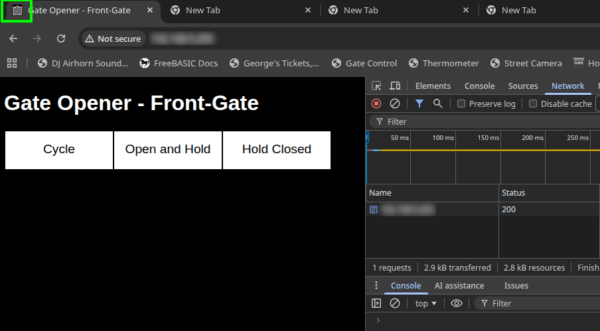
Note:
- Correct icon in upper-left
- No failed call to favicon.ico
Stuff that DID NOT Work
I tried adding a server handler for /favicon.ico and then passing binary file data back to the client. This fails for some uknown reason. I tried multiple file formats and variable declaration formats, and honestly couldn’t get it to work.
The method above is simple and reliable. Unfortunately, it adds 4k to the payload on every page refresh, but that’s not a huge amount of overhead.
UPDATE: Add this to the list of stuff that did not work.
OLD Detailed Explanation (base64-encoded PNG)
Looking at the color-coded code sample above:
| Color | Meaning | |
|---|---|---|
| █ | c++ variable declaration. | |
| █ | c++ syntax for preformatted, multiliine string | |
| █ | HTML syntax | |
| █ | base64-encoded favicon.png |
C declaration:
- “favicon” is declared as a String type.
- “const” is used because the string is immutable (non-variable variable)
- “F( )” function is specific to Arduino. This keeps the string value in non-volatile (PROGMEM) memory rather than copying to RAM.
Preformatted String:
- “R” combined with “=====(” tells C that this is a multiline (pre-formatted) string constant.
- The string constant ends with )=====”
- “=====” can be any 5 character string literal which book-ends the string constant.
- For example, “RABCDEF(String Constant)ABCDEF” works the same as “R=====(String Constant)=====”
- PHP syntax is similar.
HTML syntax:
- <LINK> tag is a general-purpose mechanism for including content from another file.
- “rel” tells the browser what KIND of link, in this case “icon”.
- “type” reiterates the content-type of the linked file.
- in [href=”data:image/x-icon;base64,]
- “href” points to the location of the linked file. Normally, this would be a URL.
- However, “data:” tells the browser that the file’s data is inline.
- “image/x-icon” is the content type.
- “base64” specifies that the file’s data is encoded as base64.
- Everything after the comma “,” is the base64 data
Base64 encoding:
- Three 8-bit bytes of data are encoded as four 6-bit groupings
- Base64 uses ONLY printable characters and is meant to be completely portable across machine types and implementations.
- Uses characters “0-9”, “A-Z”, “a-z”, “/”, “+”, and “=”
- Used for any application where a binary file needs to be embedded in to a readable or printable file, including e-mail, HTML, PKI, and LDAP.
Conclusion
Having gone through this entire process TWICE now, once with PNG and once with SVG, it just reminds me that arbitrary standards sometimes make things WAY more difficult than they should be. For example, Chrome WILL ALWAYS cache a page, even if it’s supposed to be dynamic, even if you put cache-control headers in place. But it REFUSES to cache favicon.ico, which should be completely static. If this was not the case, I could have served up a static header that includes the favicon, then redirect to a dynamic page. But because of this flaw, the dynamic page will re-request the favicon, even though Chrome already has it in cache.
Thank you for reading, and I hope you find this helpful!