ESP32 – Use built-in LED and BOOT Button
Did you know that the ESP32 has a built-in user LED and Utility Button? No need to build a simple circuit to do testing.
Overview
The ESP32 is an amazing Arduino device that has lots of GPIO pins, plenty of CPU and memory capacity, as well as built-in WiFi and Bluetooth, and many other features.
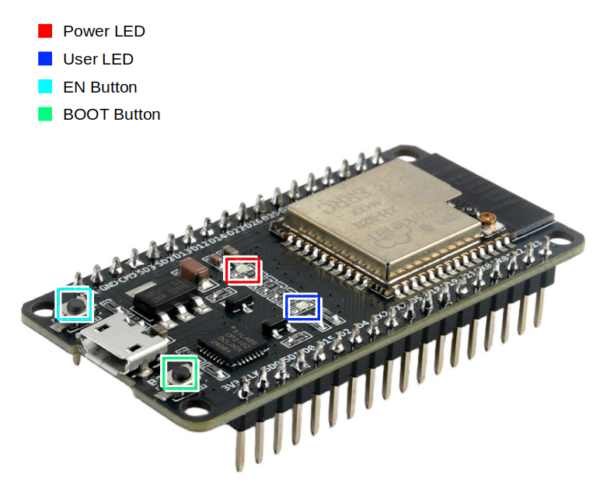
- The ESP32 has a built-in LED on pin 2, which you can use freely.
- You can use the BOOT button on GPIO0 as a utility button.
| Interface | Description |
|---|---|
| ■ Power LED | Red when power is on |
| ■ User LED | Blue when activated by pulling GPIO2 HIGH. |
| ■ EN Button | “Enable”, normally HIGH. Pushing the button pulls LOW, which reboots. |
| ■ BOOT Button | When used with “EN”, causes the device to boot in to programming mode.
Normally GPIO0 is HIGH (Normal boot mode). Pushing the button pulls GPIO0 LOW (Enter programming / download mode). However, after the device boots normally, the BOOT button can be used to send input to GPIO0. |